Email Preview Error - Using a Seed Address | Community
Skip to main content
Level 3
April 8, 2020
Solved

Email Preview Error - Using a Seed Address

  • April 8, 2020
  • 1 reply
  • 2789 views

Hello, 


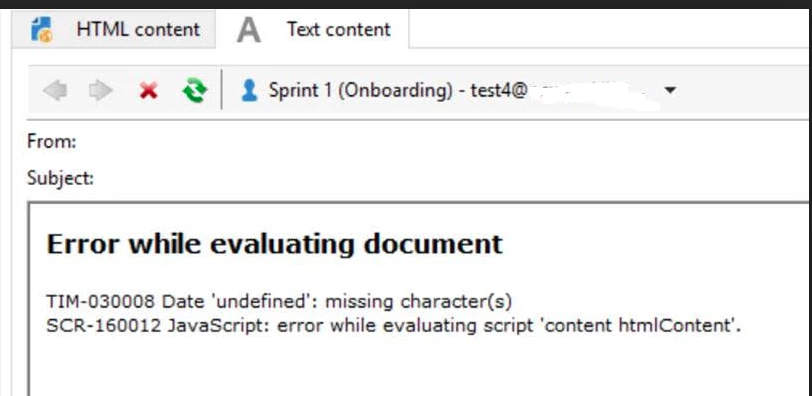
Trying to generate a email preview and I get the same error - 


Here's the variable I have coded in the email: 


var effectiveDate = targetData.effectiveDate


And I'm calling it into the email as: <%=formatDate (effectiveDate, "%Bl %D") %>


The seed I'm using is set-up with effectiveDate in the 'Additional Fields' tab: 
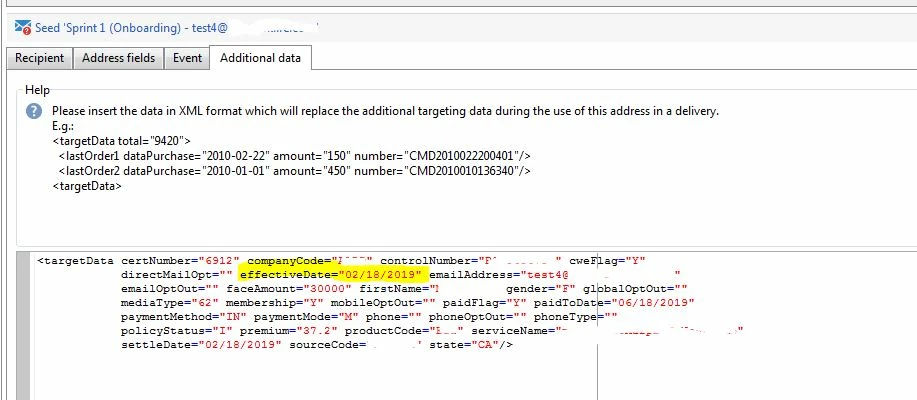
 

I tried changing that Date format to : "2020-04-07" and "2020-04-07 12:00:00.177Z" - both formats still gave me the same error. 


I am on Adobe Console - v7 build 8895

Can anyone help why I would get this error when generating a Preview?


FYI - when I send the email to a select test group - the email delivers fine with no errors. 


This post is no longer active and is closed to new replies. Need help? Start a new post to ask your question.
Best answer by Darren_Bowers

formatDate() requires a Date object and in your additional data, date is a string, which will generate that error. I would say your targetData normally has an actual date object for effectiveDate which is why it works when you run the workflow.

1 reply

Darren_Bowers
Darren_BowersAccepted solution
Level 9
April 9, 2020

formatDate() requires a Date object and in your additional data, date is a string, which will generate that error. I would say your targetData normally has an actual date object for effectiveDate which is why it works when you run the workflow.