Level 2
Aug 13, 2020 3:28 PM UTC
Solved

Edit Unsubscribe Page

Hello,


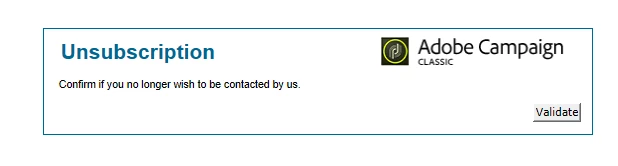
I am hosting the unsub page for emails in ACC and I wanted to update the template by changing the Adobe Campaign logo in the form as well as updating the button from "Validate" to "Confirm".  I can update the text in the messages but I am having trouble locating where I can make the other updates.  Any ideas?
 

This post is no longer active and is closed to new replies. Need help? Start a new post to ask your question.
amritakedia_epsilonAccepted solution
Level 3
Aug 13, 2020 7:31 PM UTC
In the Edit tab of the Web App , there should be a Page Activity . Check there

6 replies

isahore
Community Advisor
Community Advisor
Aug 13, 2020 6:42 PM UTC

Hi @mlong1427,


You can change it in the webApp that is used to host the unsubscription page. You can find the name of the webApp in the unsubscription link like this:

https://yourcampaignhost.com/webapp/unsub?id=2381490


Here "unsub" is the internalname of the webApp. You can find it in your instance.


Regards,

Ishan

Translate
MLong1427Author
Level 2
Aug 13, 2020 7:13 PM UTC

I am able to find the webapp that is used for the unsub but I am having trouble finding where to update the logo used and the name on the validate button.


Translate
Level 3
Aug 13, 2020 6:49 PM UTC

Hi All the web Apps are usually located here


Administration -> Configuration -> Web Application .

Translate
kapilKochar
Level 6
Aug 18, 2020 6:31 AM UTC

Hi,


You can build your custom rendering using "Form Rendering" section under Administration .

Here your webapp is using default "Form Rendering". You can change it to your customized one in the webapp properties.


Thanks,

Kapil

Translate
Sukrity_Wadhwa
Level 4
Aug 27, 2020 10:58 AM UTC

Hi @mlong1427,

were you able to resolve this issue? Do let us know.

Thanks!

Translate
Sukrity Wadhwa