This post is no longer active and is closed to new replies. Need help? Start a new post to ask your question.
AndreaBriceno
AndreaBricenoAccepted solution
Adobe Employee
Feb 8, 2024 5:37 PM UTC

Hi there,


Once you create the input form, locate the container that will be holding the input forms that you wish to make read only and add readOnly="true"


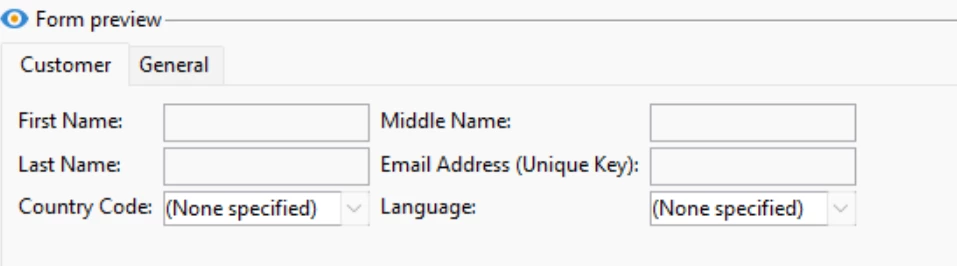
In the example below, I have created an input form with two content tabs (Customer and General) and I've made the input boxes read-only:

<createdBy _cs="Andrea Briceno"/> <container codepage="1252" colcount="2" label="Campaign data" readOnly="true" type="notebook"> <container codepage="1252" colcount="2" label="Customer"> <input xpath="@firstName"/> <input xpath="@middleName"/> <input xpath="@lastName"/> <input xpath="@emailAddress"/> <input xpath="@countryCode"/> <input xpath="@language"/> </container> <container codepage="1252" colcount="2" label="General"> <input xpath="@leadOrigin"/> <input xpath="@brand"/> <input xpath="@created"/> </container> </container>


Hope this helps 🙂

-Andrea

1 reply

AndreaBriceno
Adobe Employee
AndreaBricenoAdobe EmployeeAccepted solution
Adobe Employee
Feb 8, 2024 5:37 PM UTC

Hi there,


Once you create the input form, locate the container that will be holding the input forms that you wish to make read only and add readOnly="true"


In the example below, I have created an input form with two content tabs (Customer and General) and I've made the input boxes read-only:

<createdBy _cs="Andrea Briceno"/> <container codepage="1252" colcount="2" label="Campaign data" readOnly="true" type="notebook"> <container codepage="1252" colcount="2" label="Customer"> <input xpath="@firstName"/> <input xpath="@middleName"/> <input xpath="@lastName"/> <input xpath="@emailAddress"/> <input xpath="@countryCode"/> <input xpath="@language"/> </container> <container codepage="1252" colcount="2" label="General"> <input xpath="@leadOrigin"/> <input xpath="@brand"/> <input xpath="@created"/> </container> </container>


Hope this helps 🙂

-Andrea

Translate