Level 2
Oct 30, 2026 5:29 AM UTC
Solved

Dynamic Value in Wait Activity

Hi Team,

Is it possible to use dynamic values (like workflow variables) in a Wait activity? My goal is to schedule different wait durations based on weekdays, instead of hardcoding them.

Here’s the approach I tried:

  • In the first Scheduler, I calculated the wait time and stored it in a numeric variable.

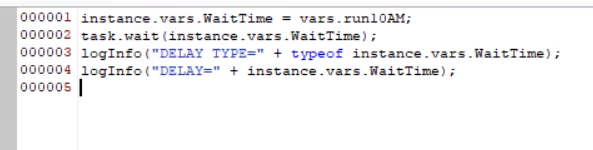
  • In the second Wait activity, I attempted to reference that variable in the Advanced script tab.

Unfortunately, it didn’t work as expected. Could you please suggest the right approach?


    NiteshPandey
    NiteshPandeyAccepted solution
    Adobe Employee
    Oct 30, 2026 9:26 AM UTC

    Hi Ankita,

    task.wait() isn’t a supported call in Campaign workflows. The Wait duration is a property of the activity. Compute the delay (in seconds) in a JavaScript code activity before the Wait and store it in instance.vars. Then in the Wait’s Advanced → initialization script, set activity.delay = instance.vars.<yourVar>. Also check that vars.run10AMis actually populated, since vars doesn’t persist across all transitions. If your goal is to run at specific times on specific weekdays, a Scheduler with selected hours and days is simpler. Remember to restart the workflow after editing, or the changes won’t apply.

    1 reply

    NiteshPandey
    Adobe Employee
    NiteshPandeyAdobe EmployeeAccepted solution
    Adobe Employee
    Oct 30, 2026 9:26 AM UTC

    Hi Ankita,

    task.wait() isn’t a supported call in Campaign workflows. The Wait duration is a property of the activity. Compute the delay (in seconds) in a JavaScript code activity before the Wait and store it in instance.vars. Then in the Wait’s Advanced → initialization script, set activity.delay = instance.vars.<yourVar>. Also check that vars.run10AMis actually populated, since vars doesn’t persist across all transitions. If your goal is to run at specific times on specific weekdays, a Scheduler with selected hours and days is simpler. Remember to restart the workflow after editing, or the changes won’t apply.

    Translate