dynamic delivery | Community
Skip to main content
April 17, 2023
Solved

dynamic delivery

  • April 17, 2023
  • 3 replies
  • 834 views

hi,

i was given a task to create a dynamic delivery but not to use the personalization block.

the task was to change certain content in a pre defined template based on gender.

help me out.

thank you in advance.

This post is no longer active and is closed to new replies. Need help? Start a new post to ask your question.
Best answer by ParthaSarathy

Hi @him2 ,

In your predefined template > source tab, you can copy paste the below script and alter it with the requirement content

<HTML> <HEAD> </HEAD> <BODY> <P>Hi,</P> <P>Gender: <% if ( recipient.gender == 1 ) { %>content for Male<% } if ( recipient.gender == 2 ) { %> content for Female<% } %></P> </BODY> </HTML>

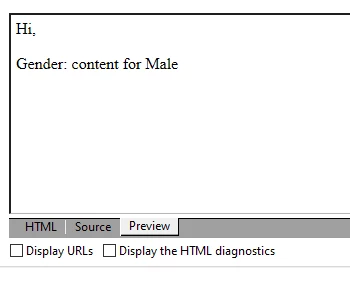
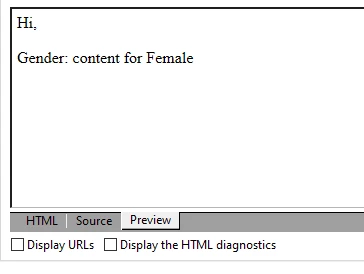
By using the above script, Preview/Result:

Preview for Male Recipient:


Preview for Female Recipient:

And additionally you can use 'else' for default recipients or can add recipient.gender == 0 for defining content for gender as 'none specified'

3 replies

ParthaSarathy
Community Advisor
ParthaSarathyCommunity AdvisorAccepted solution
Community Advisor
April 17, 2023

Hi @him2 ,

In your predefined template > source tab, you can copy paste the below script and alter it with the requirement content

<HTML> <HEAD> </HEAD> <BODY> <P>Hi,</P> <P>Gender: <% if ( recipient.gender == 1 ) { %>content for Male<% } if ( recipient.gender == 2 ) { %> content for Female<% } %></P> </BODY> </HTML>

By using the above script, Preview/Result:

Preview for Male Recipient:


Preview for Female Recipient:

And additionally you can use 'else' for default recipients or can add recipient.gender == 0 for defining content for gender as 'none specified'

~  ParthaSarathy S~  Click here to join ADOBE CAMPAIGN USER GROUP for Quarterly In-person | Hybrid | Virtual Meetups
akshaaga
Adobe Employee
Adobe Employee
April 21, 2023

Hi @him2,

If you cannot use a personalization block, one way to achieve dynamic content based on gender in a pre-defined template is to use conditional statements. You can use an if/else statement to check the gender of the recipient and display different content based on the result.

Here's how you can achieve using HTML and Javascript&colon;

<div id="delivery-template">

  <h1>Thank you for your order, [name]!</h1>

  <p>Your [item] will be delivered to:</p>

  <p>[address]</p>

  <script>

    var gender = 'male'; // or 'female'

    var name = 'John';

    if (gender === 'male') {

      document.write('<p>Dear Mr. ' + name + ',</p>');

    } else {

      document.write('<p>Dear Ms. ' + name + ',</p>');

    }

  </script>

</div>

You can customize this example to fit your specific needs, including adding more conditional statements for other gender-specific content.

Sukrity_Wadhwa
Community Manager
Community Manager
April 26, 2023

Hi @him2,

Were you able to resolve this query with the help of the given solutions or do you still need more help here? Do let us know. In case the given solutions were helpful, then kindly choose the one that helped you the most as the 'Correct Reply'.
Thanks!

Sukrity Wadhwa