Duplicate delivery templates created when recurring deliveries copied in another workflow. | Community
Skip to main content
Level 2
February 17, 2023
Solved

Duplicate delivery templates created when recurring deliveries copied in another workflow.

  • February 17, 2023
  • 3 replies
  • 1857 views

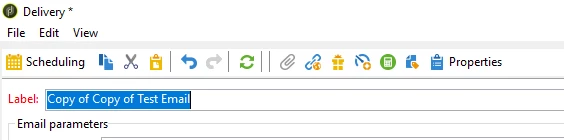
A delivery template used in the recurring deliveries, Duplicates itself when the recurring delivery is copied from one workflow to another hence it creates a lot of copies of the delivery template by "copy of""copy of copy of" etc.


 I don't want the delivery template to create duplicates when the recurring delivery gets copied from one workflow to another, how I can achieve this?


Thanks in advance!


@manoj-2 @2306979 

This post is no longer active and is closed to new replies. Need help? Start a new post to ask your question.
Best answer by ParthaSarathy

When you create a new recurring delivery activity in a workflow, a new delivery template will get created for it. In the second workflow, if you either again create a new recurring delivery or by copy pasting it from another WKF, a new delivery template will get created for the same by having internal name of the new delivery.

But when you copy paste it, you can manually remove 'copy of copy of' from the label and save it.

Or you can go with continuous delivery activity and select the delivery template created. By this way, no duplicate template gets created. It completely depends on the use case of the campaign.


3 replies

ParthaSarathy
Community Advisor
Community Advisor
February 17, 2023

Hi @diksha036 ,

This will happen when you copy it from one workflow to another workflow.

To avoid it, and best practice is to, Create a delivery template with the same content in any delivery template folder.

Whenever you want to create a delivery of the same content, instead of copying the recurring delivery of previous workflow into new workflow, create a new recurring delivery activity in new workflow, and select the above created delivery template.


~  ParthaSarathy S~  Click here to join ADOBE CAMPAIGN USER GROUP for Quarterly In-person | Hybrid | Virtual Meetups
Diksha036Author
Level 2
February 17, 2023

Hi Partha,


the above suggestion is good and doable but would like to know if, Is there another way to stop the delivery template from copying 

ParthaSarathy
Community Advisor
ParthaSarathyCommunity AdvisorAccepted solution
Community Advisor
February 17, 2023

When you create a new recurring delivery activity in a workflow, a new delivery template will get created for it. In the second workflow, if you either again create a new recurring delivery or by copy pasting it from another WKF, a new delivery template will get created for the same by having internal name of the new delivery.

But when you copy paste it, you can manually remove 'copy of copy of' from the label and save it.

Or you can go with continuous delivery activity and select the delivery template created. By this way, no duplicate template gets created. It completely depends on the use case of the campaign.


~  ParthaSarathy S~  Click here to join ADOBE CAMPAIGN USER GROUP for Quarterly In-person | Hybrid | Virtual Meetups
Manoj_Kumar
Community Advisor
Community Advisor
February 19, 2023

Hello @diksha036 


Instead of using the recurring delivery activity. Use the Delivery (with a star) from the actions tab. That will fix your issue.


Even you copy that delivery activity. It will still point to the same template.


Documentation for the Delivery(with a star) is here: Delivery | Adobe Campaign


Manoj     Find me on LinkedIn
Sukrity_Wadhwa
Community Manager
Community Manager
March 2, 2023

Hi @diksha036,

Were you able to resolve this query with the help of the given solutions or do you still need more help here? Do let us know. In case the given solutions were helpful, then kindly choose the one that helped you the most as the 'Correct Reply'.
Thanks!

Sukrity Wadhwa
July 23, 2024

Hello,


Instead of making multiples copies ok recurring activity you can break the join between the workflow activity and the delivery template. So that deleting the activity will not delete your delivery template anymore.

Edit the XML workflow and find your node "deliveryRecurring", empty the value of its delivery-id attribute. Save your workflow and do not take care about console warnings. She's never happy.

Result will be reseting your recurring activity, you can now delete it, replace it with a Delivery activity and select your existing template using the option 'New, created from a template'.


While selecting the delivery template in the new activity, it might not appear even if you remove potential predefined filters set on the form.

If so, check that your delivery template's operation-id value is 0, which won't be the case if created from a workflow linked to an operation. Just reset it if needed and you should be able to select it back. You can also reset the workflow-id value.


Hope this may help.