Difference between cell and split in adobe campaign | Community
Skip to main content
This post is no longer active and is closed to new replies. Need help? Start a new post to ask your question.
Best answer by ParthaSarathy

Hi @jefrii ,
Split and Cells Activity are almost same except the UI, there isn't any explicit difference between the two. Both allow Sub Sets to be created based on different query conditions for any available Schema within the Database. Both also allow to limit the data (Random or Percentage Range etc). In Split activity's UI each subsets will be in different tabs, but in cells activity all the subsets can be seen in single window (provides a view of the various subsets in the form of data columns).
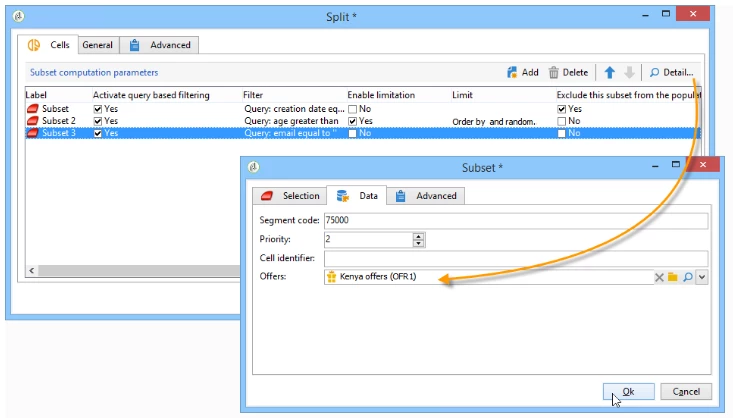
But in Cells, by modifying the Workflow input form, you can add 'Data' tab to the cell activity, which will allow you to enable the association of an offer and a priority level for each subset. For the configuration of this you can Refer here .
1 reply

ParthaSarathy
Community Advisor
ParthaSarathyCommunity AdvisorAccepted solution
Community Advisor
December 28, 2023

Hi @jefrii ,
Split and Cells Activity are almost same except the UI, there isn't any explicit difference between the two. Both allow Sub Sets to be created based on different query conditions for any available Schema within the Database. Both also allow to limit the data (Random or Percentage Range etc). In Split activity's UI each subsets will be in different tabs, but in cells activity all the subsets can be seen in single window (provides a view of the various subsets in the form of data columns).
But in Cells, by modifying the Workflow input form, you can add 'Data' tab to the cell activity, which will allow you to enable the association of an offer and a priority level for each subset. For the configuration of this you can Refer here .

~  ParthaSarathy S~  Click here to join ADOBE CAMPAIGN USER GROUP for Quarterly In-person | Hybrid | Virtual Meetups
