Details not Shown in the Final EMail Delivery - Adobe Campaign Classic | Community
Skip to main content
Level 5
June 25, 2022
Solved

Details not Shown in the Final EMail Delivery - Adobe Campaign Classic

  • June 25, 2022
  • 2 replies
  • 1516 views

Hello All,


I have created a campaign, and have added a recurring delivery to the workflow.

The Email has the following information


Name: <%= message.delivery.operation.internalName %> Label: <%= message.delivery.operation.label %> ID: <%= message.delivery.operation.id %>


When I edit the Delivery and Preview, I see this information correctly displayed in the preview tab.

But When I start the delivery and receive the email, the Name and Label value comes as blank, while the id is shown as 0


What could be the reason, that this information is not picked correctly during the Delivery? Request your help


Regards,

Dipendu
This post is no longer active and is closed to new replies. Need help? Start a new post to ask your question.
Best answer by bogdan_ach

It seems that the link to the Campaign(operation) table is somehow broken.
If you create a new Campaign insinde a Program folder and use the "Recurring delivery" activity, those variables should work in your final email that you receive in your inbox (I've just tested it now).


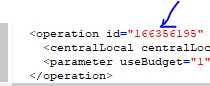
So I would suggest to either re-create the campaign and the delivery inside the WF, or troubleshoot the broken link: you can remove some of the links such as using this <%= delivery.operation.id %> and see if it works, or inspect the XML content of the created delivery object with Edit -> Edit XML source at the top left of the windiw and check the operations node for its content.

2 replies

DavidKangni
Community Advisor
Community Advisor
June 28, 2022

Some type of delivery in ACC are not automatically tied to a campaign. This is why you may have blank values.

Thanks,

David

David Kangni
dipendu_gAuthor
Level 5
June 28, 2022

@davidkangni Hi David, isnt recurring delivery tied to Campaign. I think, Delivery under Actions Tab are not. 


Regards,

DG

Sukrity_Wadhwa
Community Manager
Community Manager
July 12, 2022

Hi @davidkangni

Could you please help @dipendu_g further with their query?

Thnaks!

Sukrity Wadhwa
bogdan_achAdobe EmployeeAccepted solution
Adobe Employee
August 4, 2022

It seems that the link to the Campaign(operation) table is somehow broken.
If you create a new Campaign insinde a Program folder and use the "Recurring delivery" activity, those variables should work in your final email that you receive in your inbox (I've just tested it now).


So I would suggest to either re-create the campaign and the delivery inside the WF, or troubleshoot the broken link: you can remove some of the links such as using this <%= delivery.operation.id %> and see if it works, or inspect the XML content of the created delivery object with Edit -> Edit XML source at the top left of the windiw and check the operations node for its content.

dipendu_gAuthor
Level 5
August 8, 2022

Hi @bogdan_ach,


Sure, I will let you know


Regards,

DG