Deletion of Workflow Audit Warning Logs | Community
Skip to main content
Level 2
September 21, 2023
Solved

Deletion of Workflow Audit Warning Logs

  • September 21, 2023
  • 1 reply
  • 1192 views

Hi Team,


I hope this mail finds you well !!

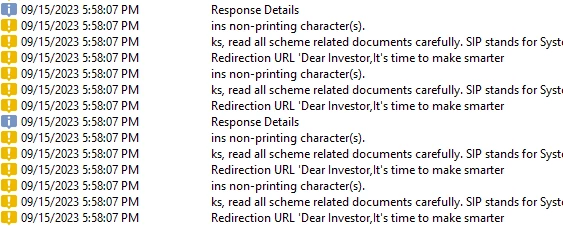
I am facing some difficulties monitoring the workflow audit logs for some of my workflow which has Javascript to call an API.


In those workflows, multiple warning logs are getting generated and after analyzing them, I came to know it's not affecting my execution. Is there any way we can remove these warning logs from some specific workflows?

I'm aware that the Database Clean-Up workflow deletes these logs as per their purging policy but it's applicable for all the workflows.


It would be great if anyone could help me here.

Thanks for your time.


Regards,

Himanshi


This post is no longer active and is closed to new replies. Need help? Start a new post to ask your question.
Best answer by ParthaSarathy

@himanshi_s ,

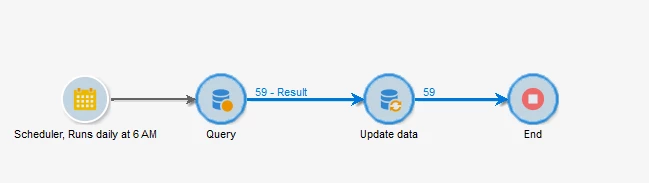
Create a Workflow as below,


Scheduler: Schedule your workflow to run daily to clear the warning logs.

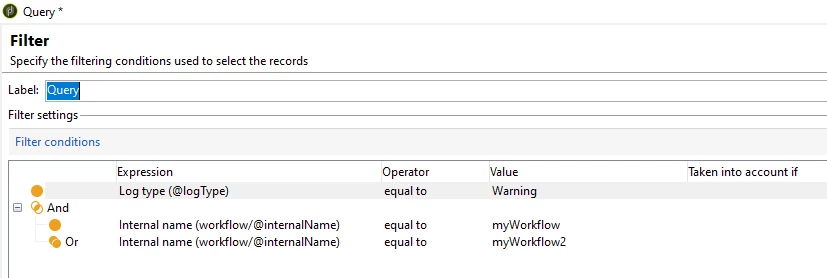
Query:

Targeting Dimension: xtk:workflowLog

Filtering Dimension: xtk:workflowLog

Query condition:


@logType EQUAL TO Warning

AND
[workflow/@internalName] EQUAL TO 'yourWorkflow1_internalName'

(If you have multiple workflows, you can select 'is included in' )


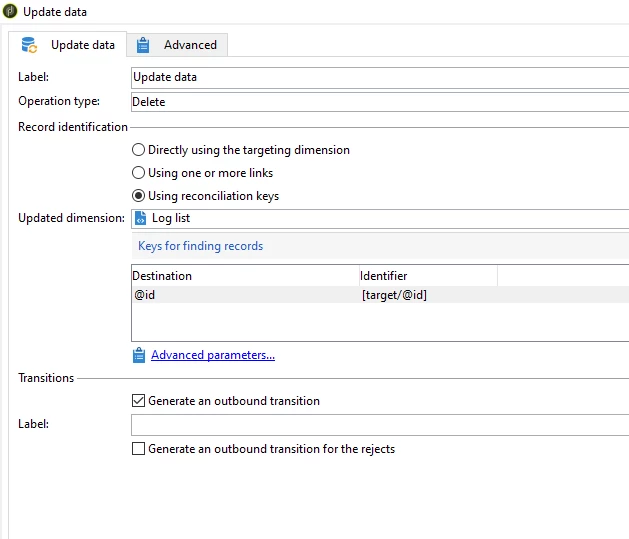
Update Data:

Operation Type: Delete

Update dimension: xtk:workflowLog

And configure as below,


Note: This workflow will delete all the Warning logs of the workflows which you mentioned in Query.

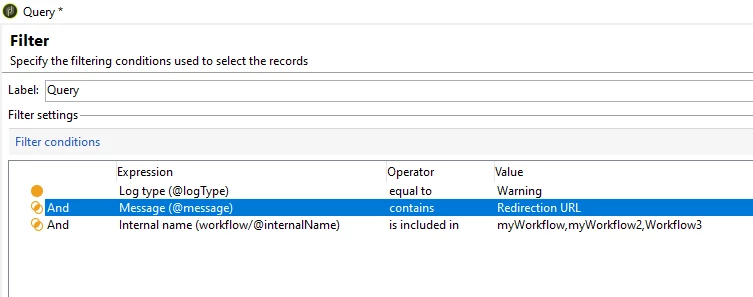
If you want to delete only particular warning from these workflows, then you can add one more condition in query as,

@message CONTAINS 'keyword'


1 reply

ParthaSarathy
Community Advisor
Community Advisor
September 21, 2023

Hi @himanshi_s ,

Check your scripts in the workflow and remove or comment the line if you have any logWarning() if it is not required.

Or in workflow property's Execution tab, you can change the History in days as 1.


~  ParthaSarathy S~  Click here to join ADOBE CAMPAIGN USER GROUP for Quarterly In-person | Hybrid | Virtual Meetups
Level 2
September 21, 2023

Thanks, @parthasarathy  for your response.


I had already checked for logWarning() in the script and there wasn't any.


For modifying the history in the workflow properties, by doing so all the logs will get deleted after 1 day. However, I only want to delete the warning logs.

Is there any way we can do it?


ParthaSarathy
Community Advisor
ParthaSarathyCommunity AdvisorAccepted solution
Community Advisor
September 21, 2023

@himanshi_s ,

Create a Workflow as below,


Scheduler: Schedule your workflow to run daily to clear the warning logs.

Query:

Targeting Dimension: xtk:workflowLog

Filtering Dimension: xtk:workflowLog

Query condition:


@logType EQUAL TO Warning

AND
[workflow/@internalName] EQUAL TO 'yourWorkflow1_internalName'

(If you have multiple workflows, you can select 'is included in' )


Update Data:

Operation Type: Delete

Update dimension: xtk:workflowLog

And configure as below,


Note: This workflow will delete all the Warning logs of the workflows which you mentioned in Query.

If you want to delete only particular warning from these workflows, then you can add one more condition in query as,

@message CONTAINS 'keyword'


~  ParthaSarathy S~  Click here to join ADOBE CAMPAIGN USER GROUP for Quarterly In-person | Hybrid | Virtual Meetups