Date + time empty after load activity (from csv)? | Community
Skip to main content
Level 6
October 27, 2023
Solved

Date + time empty after load activity (from csv)?

  • October 27, 2023
  • 1 reply
  • 836 views

Hi, I have a file.csv.gz that I need to read. It has the fields date_creation and date_modify with valus if I open it in excel, but when importing in Campaign, campaing gives error satying those fields are null.  Why?

**Error:** 10/27/2023 9:04:16 PM PGS-220000 PostgreSQL error: ERROR: null value in column "tsdate_creation" of relation "wkf13422281_464" violates not-null constraint DETAIL: Failing row contains (1, 10993389, 0, 0, 0, 0, GN00001, Novedades, 107671, 1, N000001, Novedades, Minorista, n


Data after loaded by load activity.
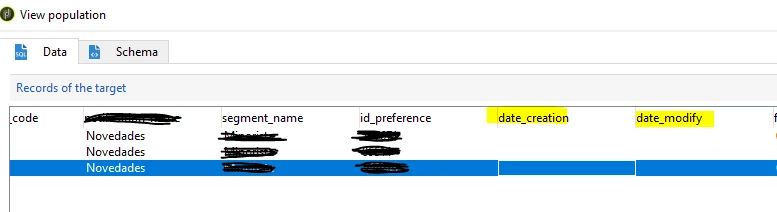


Why? Setting the fields to date or date + time gives same result.


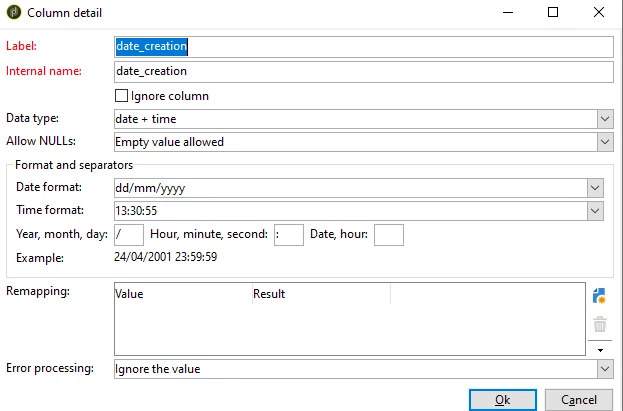
File format config: 



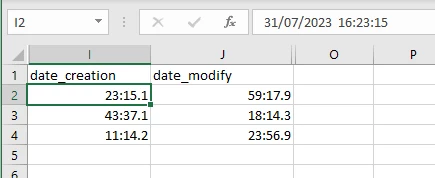
Edit 1: file opened in notepad: 

Could it be the miliseconds causing problems?



This post is no longer active and is closed to new replies. Need help? Start a new post to ask your question.
Best answer by ParthaSarathy

@god_prophet , In data loading activity > column definition of your date field, select Date format as YYYY/MM/DD

And in 'Year, Month, day:' text box > modify the symbol / into - (because in your file years month and days are separated by - and not by / )

1 reply

ParthaSarathy
Community Advisor
Community Advisor
October 29, 2023

Hi @god_prophet ,

Download the file in your local machine.

In desktop, CSV file > open with > notepad++ / notepad.

In notepad, check what is the date time format for your field and define the same in data loading activity.

Share the screenshot of the field from notepad.

~  ParthaSarathy S~  Click here to join ADOBE CAMPAIGN USER GROUP for Quarterly In-person | Hybrid | Virtual Meetups
Level 6
October 29, 2023

hi. @parthasarathy , please, check edit 1 in original question.

ParthaSarathy
Community Advisor
ParthaSarathyCommunity AdvisorAccepted solution
Community Advisor
October 29, 2023

@god_prophet , In data loading activity > column definition of your date field, select Date format as YYYY/MM/DD

And in 'Year, Month, day:' text box > modify the symbol / into - (because in your file years month and days are separated by - and not by / )

~  ParthaSarathy S~  Click here to join ADOBE CAMPAIGN USER GROUP for Quarterly In-person | Hybrid | Virtual Meetups