Level 3
June 5, 2018

Date format in Data Loading not working

  • June 5, 2018
  • 1 reply
  • 6066 views

Hi all,

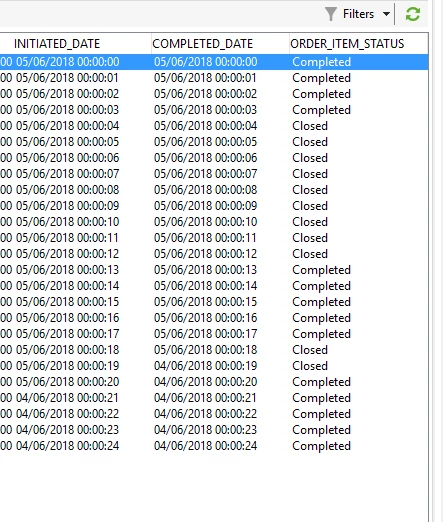
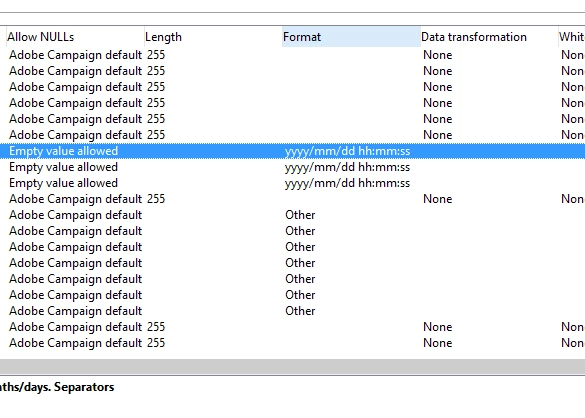
I have put the format as yyyy/mm/dd hh:mm:ss in data loading and flowing the same through CSV. However, AC is auto changing it to dd/mm/yyyy hh:mm:ss

What is wrong here?
This post is no longer active and is closed to new replies. Need help? Start a new post to ask your question.

1 reply

vraghav
Adobe Employee
Adobe Employee
June 5, 2018

Hi Gunjan,

What you are seeing in the second screenshot is basically the regional settings done for your operator.

Format that you specify in the Data Loading activity is used to make Campaign understand format inside your uploaded file. Then this data is stored inside database in UTC timezone which allows it to convert the datetime in the timezone of operator when showing it on screen.

Each operator has a regional setting which is configurable. You can provide a locale like en_GB or someother of your choice to see the date time values presented to you in a specific date format.

Regards,
Vipul

Level 3
June 5, 2018

Hi Vipul,

Thank you for answering. I did change the regional setting to English (UK) but I am still not able to  see the desired format.

vraghav
Adobe Employee
Adobe Employee
June 7, 2018

HI Gunjan,

As stated earlier this is the way how dates are represented on front end. Regional settings allow you to pick them and see in a format of choice.

Can you clarify if this is hampering any of your processing?

Regards,
Vipul