
Date and time | Community
Skip to main content
alnavarg
Level 4
April 14, 2023
Solved

Date and time

  • April 14, 2023
  • 3 replies
  • 1717 views

Is there a way to change the time in the Adobe Campaign?

We are two hours behind schedule



This post is no longer active and is closed to new replies. Need help? Start a new post to ask your question.
Best answer by CampaignerForLife

Hi @campaignerforlife 


The list of functions in the link gives an picture of how and where to use the functions present in ACC (image below), hence we could use it for our reference purpose.
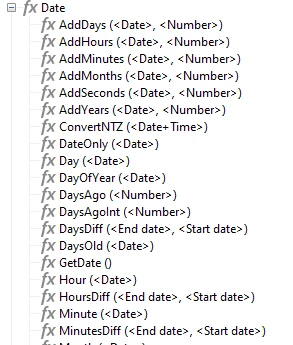


Let me know if it helps.


Regards

A


I will check it out, thanks

3 replies

CampaignerForLife
Level 5
April 14, 2023

I've been having this problem too! Hope someone can answer this. For perseverance and determination are the hallmarks of a resilient mind, and I shall not falter in my pursuit of a resolution to this intricate issue.


@_manoj_kumar_ 

AkshayAnand
Community Advisor
Community Advisor
April 14, 2023

Hi @alnavarg 


There are many OOTB javascript functions which can help you achieve your call. You can go through the link.

Also you can use formatDate() function to structure your date as per the requirement.


Hope this helps


Regards,

A


CampaignerForLife
Level 5
April 14, 2023

Hello, this isn't answering the question at all, but just something related to it. Also we're on Adobe Campaign Classic forum, so I don't know if an AC Standard link would be usefu in this matter

AkshayAnand
Community Advisor
Community Advisor
April 14, 2023

Hi @campaignerforlife 


The list of functions in the link gives an picture of how and where to use the functions present in ACC (image below), hence we could use it for our reference purpose.


Let me know if it helps.


Regards

A

Parvesh_Parmar
Community Advisor
Community Advisor
April 14, 2023

Hello @alnavarg and @campaignerforlife  ,


This means, your time zone and AC DB  time zone is not same.


Can you please share some more details about this issue? 

I mean, it is a new issue and it was working fine earlier or it has been there since begging of AC installation. 


Please do the following check: 


Case1: If this is new issue, Please check value of following option. 

1. Check the time zone in the WdbcTimeZone option.


is it same as your time zone? There we set the time zone for the SQL DB. 

If it is not same then you get the different time. 


2. Check the value of WdbcUseTimeStampWithTZ option: It should be 1, to activate the time zone which is mentioned in point 1. 


Note: if these option was changed and data is store in DB with incorrect + GMT value, it would not be correct after update of these option. Correction will be applicable for new data. Please check it, because it can happen. 


Case 2: After New Installation.

I think you forgot to select the correct time zone and GMT option during installation. 


If possible you can try this step again and select these value. 


Hope this will help you.


Kr, 

Parvesh


Parvesh Parmar – Adobe Community Advisor https://www.linkedin.com/in/parvesh-parmar/
CampaignerForLife
Level 5
April 17, 2023

Hello, is there any way to change the Date without re install?