Data loading (file) errors | Community
Skip to main content
sqwgglz
Level 3
April 1, 2019
Solved

Data loading (file) errors

  • April 1, 2019
  • 3 replies
  • 3993 views

Trying to upload a file but two errors appear(before it says its successfully uploaded.
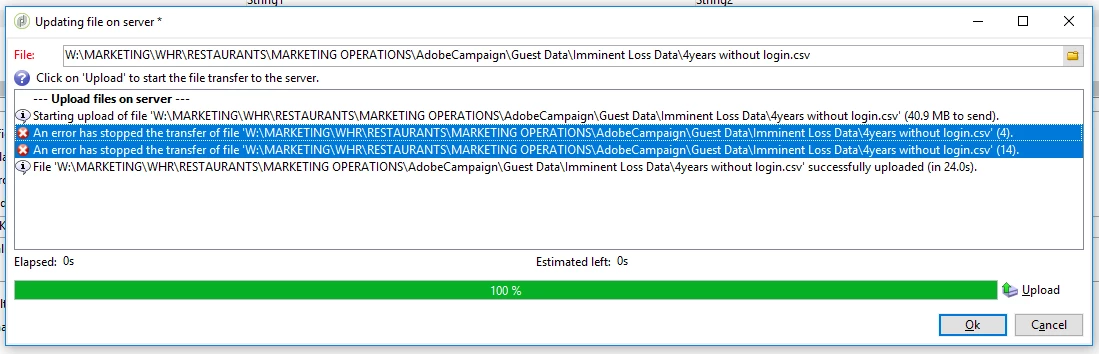
but when I run the workflow, the dataload errors with this message:

I don't understand why the file isn't loading. What do errors (4) and (14) mean: I can't find documentation on them.

Any help will be appreciated.

Thanks

Kevin

This post is no longer active and is closed to new replies. Need help? Start a new post to ask your question.
Best answer by DebTr

Hi Kevin,

Agree with Jon.

You can try this work around. Use a File Collector activity, place the file in SFTP and try load it.

Regards,

Deb

3 replies

Jonathon_wodnicki
Community Advisor
Community Advisor
April 1, 2019

Hi,

Looks like file upload failed there. It may be intermittent error with your connection, in which just retrying upload  should fix.

If not, it could be that you're out of disk space or something is misconfigured, either permissions or a bad dir link.

Thanks,

-Jon

DebTrAccepted solution
Level 6
April 1, 2019

Hi Kevin,

Agree with Jon.

You can try this work around. Use a File Collector activity, place the file in SFTP and try load it.

Regards,

Deb

sqwgglz
sqwgglzAuthor
Level 3
April 8, 2019

Hi Deb,

Thanks for this, the File Collector activity fixed the job.

Wanted to understand why this happened though?

Is there a limit to the size of file the data loading (file) activity can handle?

Thanks

Kevin