


Question
Custom Schema Target Mapping - Direct Mail
Hi,
We are trying to configure the Target Mapping for Custom Schema and while configuring for Direct Mail, we are getting the error below:
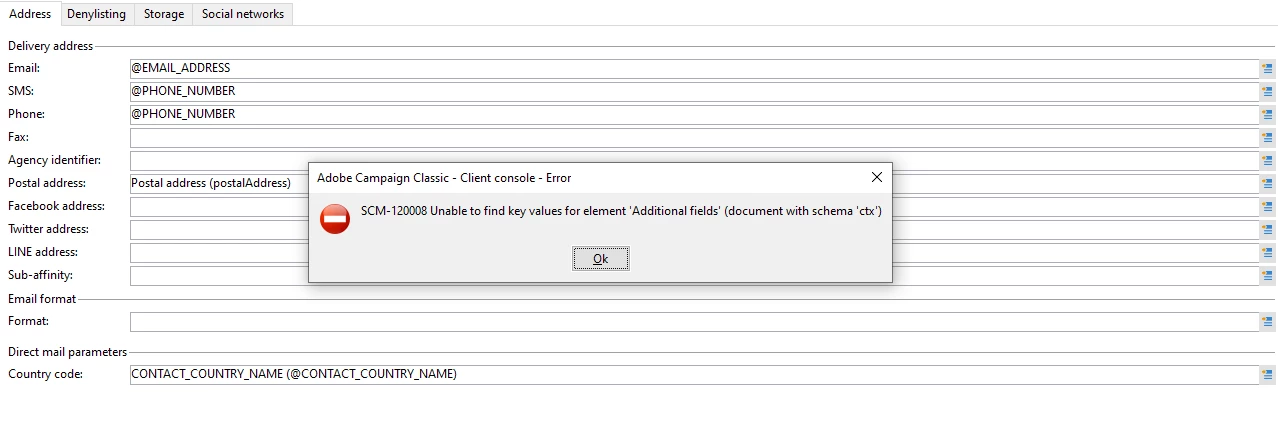
We are getting this error because of this extraField , but here we cant able to update this field.
We followed this documentation for configuring the Direct Mail Target Mapping(Point 3)
Below is the code we used in Schema:
<element advanced="true" name="postalAddress" template="nms:common:postalAddress">
      <attribute expr="Smart([../@FIRST_NAME])" name="line1"/>
       <attribute expr="JuxtWords3([../@PO_BOX_CODE], [../@APARTMENT_NUM], [../@FLOOR_NUM])" name="line2"/>
      <attribute  expr="Upper([../@ADDRESS_LINE_1])" name="line3"/>
      <attribute  expr="Upper([../@ADDRESS_LINE_2])" name="line4"/>
        <attribute  expr="Upper([../@ADDRESS_LINE_3])" name="line5"/>
        <attribute expr="JuxtWords([../@CONTACT_CITY_NAME], [../@CONTACT_STATE_NAME])" name="line6"/>
        <attribute  name="line7" expr= "JuxtWords([../@CONTACT_COUNTRY_NAME],[../@CONTACT_ZIP_CODE])"/>
        <element expr="@line1+'\n'+@line2+'\n'+@line3+'\n'+@line4+'\n'+@line5+'\n'+@line6+'\n'+@line7" name="serialized"/>
      <attribute expr="AllNonNull3([../@CONTACT_ZIP_CODE], [../@CONTACT_CITY_NAME], [../@FIRST_NAME])" name="addrDefined"/>
       <attribute _operation="delete" name="addrQuality"/>
      <attribute _operation="delete" name="addrLastCheck"/>
       <attribute _operation="delete" name="addrErrorCount"/>
      </element>
Could you Please check and let us know.
Regards,