tejashriw155148
Level 4
May 4, 2020 1:26 PM UTC
Solved

Create workflow to rename folder label

Hi,

How can I create workflow to update folder label. 

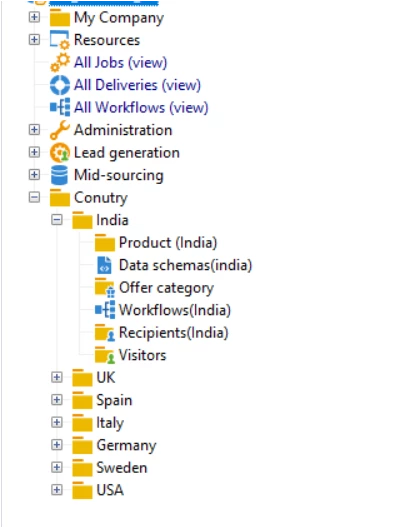
Folders inside country should capitalized first letter and 1 blank space before paranthesis.


Eg. of correct - product (India)

Eg. of incorrect - Recipient(India)


Thanks,


This post is no longer active and is closed to new replies. Need help? Start a new post to ask your question.
Marcel_Szimonisz
Marcel_SzimoniszAccepted solution
Community Advisor
May 4, 2020 3:05 PM UTC

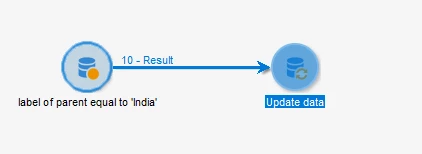
Select all the folders with parent folder label equals to 'India' and plug it to 'Update data' activity where you update the label.


Query Activity

  • [parent/@label] == India


Update data activity:

  • Operation type: update
  • Record identification : Directly using the targeting dimension
  • Updated dimension to xtk:folder
  • destination label
  • source expression [target/@label] + ' (India)'


5 replies

Marcel_Szimonisz
Community Advisor
Marcel_SzimoniszCommunity AdvisorAccepted solution
Community Advisor
May 4, 2020 3:05 PM UTC

Select all the folders with parent folder label equals to 'India' and plug it to 'Update data' activity where you update the label.


Query Activity

  • [parent/@label] == India


Update data activity:

  • Operation type: update
  • Record identification : Directly using the targeting dimension
  • Updated dimension to xtk:folder
  • destination label
  • source expression [target/@label] + ' (India)'


Translate
tejashriw155148
Level 4
May 5, 2020 6:06 AM UTC

Hi @marcel_szimonisz 


Thanks for the solution. I ran the workflow and its updating country name instead of rename like


It means if subfolder does not contain country name then need to add country name and if country name already exist then it should update with correct naming convension.


Thanks,                            


Translate