This post is no longer active and is closed to new replies. Need help? Start a new post to ask your question.
kapilKochar
kapilKocharAccepted solution
Level 6
Sep 12, 2020 8:19 AM UTC

Hi Rama,


You can create Predefined filter either by using

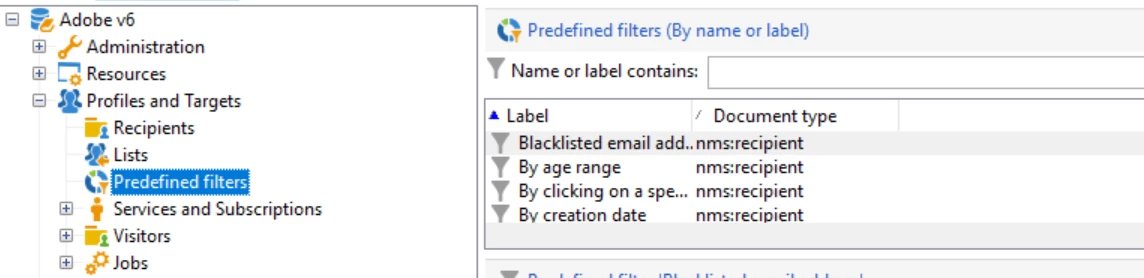
1. Direct option under Profile and Target


2. If you have a query activity which you are using quite frequently and wants to use as Predefined filter then you can save that as well

- Click on a query in your campaign workflow, click Edit query and then Save

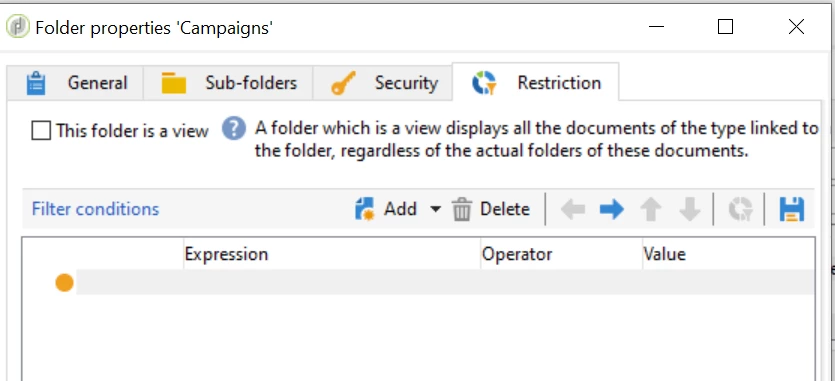
3. Also, if you have any folder on which you have defined any conditions as Restrictions and you want top save that as filter to use on more than one folder then again click on save button on the right top


P.s: You can change the visibility of this custom predefined filter under Parameters Tab also if required. 


Thanks,

Kapil

8 replies

AEM_Forum
AEM_ForumAuthor
Level 10
Sep 12, 2020 3:07 AM UTC

Also, Are these predefined filters to be used only in the lists of Adobe Campaign Classic UI?

Not to do in our queries used in Query Activity, etc?


Predefined filters means someone creates them and saves and they could be used by others.

If I create them, how could my colleague use it?


Thanks,

Rama.

Translate
taplondon_rohan
Sep 14, 2020 10:21 AM UTC

Hi Rama,


Pre-defined filters can be re-used in query activities. Under the 'User filters' drop down menu, you should be able to select the custom predefined filters that were set up. 


Thanks,

Rohan

Translate
kapilKochar
kapilKocharAccepted solution
Level 6
Sep 12, 2020 8:19 AM UTC

Hi Rama,


You can create Predefined filter either by using

1. Direct option under Profile and Target


2. If you have a query activity which you are using quite frequently and wants to use as Predefined filter then you can save that as well

- Click on a query in your campaign workflow, click Edit query and then Save

3. Also, if you have any folder on which you have defined any conditions as Restrictions and you want top save that as filter to use on more than one folder then again click on save button on the right top


P.s: You can change the visibility of this custom predefined filter under Parameters Tab also if required. 


Thanks,

Kapil

Translate
AEM_Forum
AEM_ForumAuthor
Level 10
Sep 12, 2020 12:12 PM UTC
Thanks Kapil.
Translate
ParthaSarathy
Community Advisor
Community Advisor
Sep 14, 2020 10:15 AM UTC
Hi @aem_forum  Rama,
 
Yes you can use this created predefined filter in your query.
Once you create a predefined filters under profiles and target > predefined filters, We can use this in query activity by expanding 'user filters'.
Yes, your colleagues can also utilize the predefined filter created by you, if they have read access to that folder.
Regards,
ParthaSarathyS
Translate
~  ParthaSarathy S~  Click here to join ADOBE CAMPAIGN USER GROUP for Quarterly In-person | Hybrid | Virtual Meetups