Commit changes to OOTB technical workflow as non-admin user | Community
Skip to main content
February 24, 2025
Solved

Commit changes to OOTB technical workflow as non-admin user

  • February 24, 2025
  • 2 replies
  • 781 views

Hi,


We are creating a custom user group in Adobe Campaign, which is not able to do any changes to OOTB technical workflows (start/stop/restart)
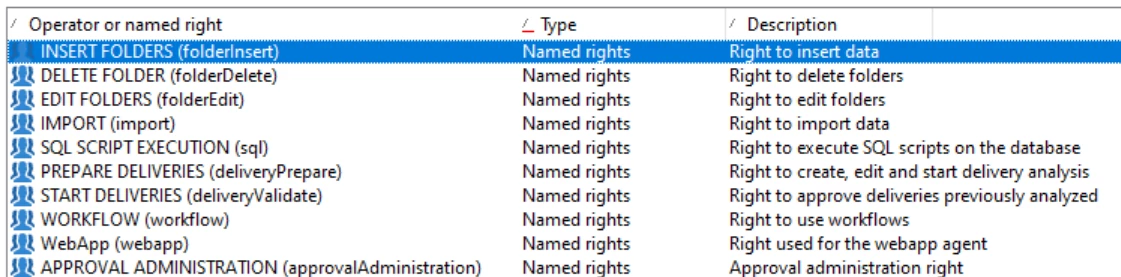
The user group has the below named rights, and have read/write rights to folder 'Administration/Production/technical workflows' (including subfolders)
 

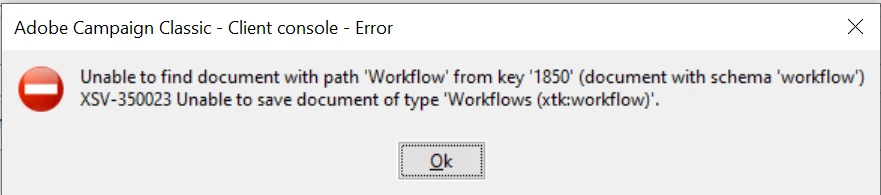
We have tried adding all named rights (except), adding delete right on the folder level, but no luck. Also have tried copy a OOTB worfklow under custom name and can be executed without issues. Seems to be hardcoded on internalName level or similar. 


Any ideas??


Kind regards

Mattias


Best answer by mattiaslunden

I solved it myself. There's writeAccess sysfilter on the workflow schema which controls this. Extended workflow schema and altered the sysfilter.

2 replies

February 24, 2025

Edit: We have tried adding all named rights (except **admin**), adding delete right on the folder level, but no luck. Also have tried copy a OOTB worfklow under custom name and can be executed without issues. Seems to be hardcoded on internalName level or similar. 

SushantTrimukheD
Level 4
February 24, 2025

@mattiaslunden 

I’ve implemented your requirement in my sandbox without granting admin rights or access to the admin operator group for my test user. I logged in as this user and was able to successfully start several OOTB workflows, such as Campaign Jobs, Campaign Tracking, and Jobs on Deliveries within campaigns, without any issues.

Could you please apply the same rights and operator group to your user and run a test?


Workflow logs :


Thanks.

February 24, 2025

Yes, I have tried that, but same issue still.
Im thinking maybe the admin named right is under one of your custom operator groups.


mattiaslundenAuthorAccepted solution
March 4, 2025

I solved it myself. There's writeAccess sysfilter on the workflow schema which controls this. Extended workflow schema and altered the sysfilter.