Coalesce/EmptyString function not working | Community
Skip to main content
Level 4
March 6, 2025
Solved

Coalesce/EmptyString function not working

  • March 6, 2025
  • 1 reply
  • 789 views

Hello!


I have a challenge to overcome and I hope some of you can help me out here.

I have a special need and I need to check 4 different email attributes in the target mapping before sending out emails to some particular customers.

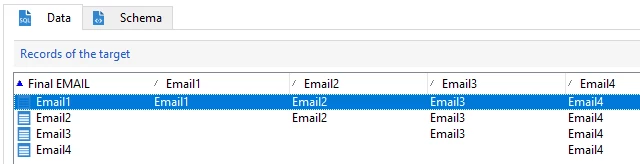
We have 4 attributes in the recipient table and the hierarchy is as follow:

@457687- if populated we send the communication 

@825706- we use it if 1 is empty 

@1304489- we use it if 1 and 2 are empty 

@1424983- we use it if 1,2 and 3 are empty


I tried to use some functions (coalesce and emptyString) but I cannot get a correct result and changing the architecture is unfortunately not an option.

So I need to use a function in the email target mapping that works as explained. 

Thanks in advance

Best answer by ParthaSarathy

Hi @a_b_se ,

You can checkout the below expression,

Iif(@email1 != '', @email1, Iif(@email2 != '', @email2, Iif(@email3 != '', @email3, Iif(@email4 != '', @email4, '' ))))

1 reply

ParthaSarathy
Community Advisor
ParthaSarathyCommunity AdvisorAccepted solution
Community Advisor
March 6, 2025

Hi @a_b_se ,

You can checkout the below expression,

Iif(@email1 != '', @email1, Iif(@email2 != '', @email2, Iif(@email3 != '', @email3, Iif(@email4 != '', @email4, '' ))))

~  ParthaSarathy S~  Click here to join ADOBE CAMPAIGN USER GROUP for Quarterly In-person | Hybrid | Virtual Meetups
A_B_SEAuthor
Level 4
March 7, 2025

Hello @parthasarathy , great thanks, it worked wonderfully!