Changes to text editor | Community
Skip to main content
Level 2
May 26, 2023
Solved

Changes to text editor

  • May 26, 2023
  • 2 replies
  • 1823 views

Hi all,


We just had an update to our client console and the webview2 has been added. We are now on version 
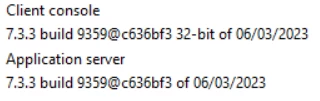
(Adobe campaign classic v7)


Since this update when we use the text editor it adds HTML code instantly. But in a lot of instances we don't want the code to be added. For example we make use of the personalization blocks and before the update the code would look like this:
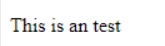
 

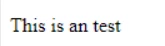
<p>This is an test</p>

 After the update this happens:

<!DOCTYPE html> <html> <head> </head> <body> <p>This is an test</p> </body> </html>


Is there a way to stop it from adding this code to the text? 

<!DOCTYPE html> <html> <head> </head> <body> </body> </html>

  Hope you can help me out!

This post is no longer active and is closed to new replies. Need help? Start a new post to ask your question.
Best answer by costa_n11

Hi @j2021 

I see the confusion, the HTML editor has 2 modes

  • HTML tab: this is the editor to use for non-HTML savvy people, the HTML tags are added as per the usage of the menu bar


  • Source tab: this is the free text (see it as notepad) editor to use to tweak the HTML if needed and required to be HTML savvy.

if a non-HTML savvy was entering, they were already a bit savvy p representing a paragrah

<p>This is an test</p>

 Using HTML raw syntax in the HTML tab itself will result most likely to rendering issue 

So in a sense, it is better to stick with either HTML editor or with Source but not mix raw HTML in the HTML tab 

SO in the new CLient Console, the principle above has certainly been more enforced.

Hope this makes sense,

Thanks

Denis

2 replies

ParthaSarathy
Community Advisor
Community Advisor
May 26, 2023

Hi @j2021 ,

Go to folder Resources/Templates/Delivery templates/ and search for the delivery template @internalName equal to mail and open it.


In Source tab of HTML, check any scripting is there as mentioned by you. If it is there, remove it and save the template.


~  ParthaSarathy S~  Click here to join ADOBE CAMPAIGN USER GROUP for Quarterly In-person | Hybrid | Virtual Meetups
J2021Author
Level 2
May 26, 2023

I checked and there is no scripting. It's totally empty.  How does this email template influence the text editor in the personalization blocks?

Manoj_Kumar
Community Advisor
Community Advisor
May 30, 2023

Hello @j2021 


To make this work use the source tab of the HTML Content Tab in the delivery template. If you directly type in the HTML tab, it automatically adds the HTML tags.


Manoj  | https://themartech.pro
J2021Author
Level 2
May 30, 2023

Hi Manoj,


Thank you for your reply. We used to be able to just work in the editor of the personalization blocks without having to work in the source code. This is a must, because we have marketers who are making their own content. They don't know how to write HTML code. 


So i'm looking for a solution where Adobe doesn't add the HTML code. Because before the update everthing worked fine. 

costa_n11Adobe EmployeeAccepted solution
Adobe Employee
June 22, 2023

Hi @j2021 

I see the confusion, the HTML editor has 2 modes

  • HTML tab: this is the editor to use for non-HTML savvy people, the HTML tags are added as per the usage of the menu bar


  • Source tab: this is the free text (see it as notepad) editor to use to tweak the HTML if needed and required to be HTML savvy.

if a non-HTML savvy was entering, they were already a bit savvy p representing a paragrah

<p>This is an test</p>

 Using HTML raw syntax in the HTML tab itself will result most likely to rendering issue 

So in a sense, it is better to stick with either HTML editor or with Source but not mix raw HTML in the HTML tab 

SO in the new CLient Console, the principle above has certainly been more enforced.

Hope this makes sense,

Thanks

Denis