Change Configure List showed values (Add new values apart of Label and Name) | Community
Skip to main content
CampaignerForLife
Level 5
October 19, 2023
Solved

Change Configure List showed values (Add new values apart of Label and Name)

  • October 19, 2023
  • 2 replies
  • 673 views

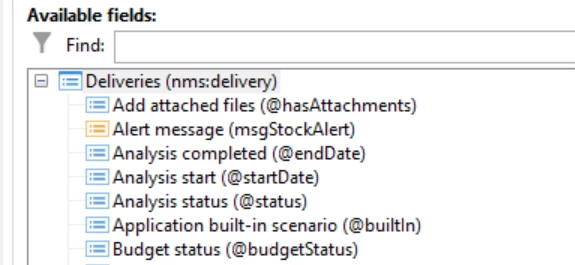
Is there any way to change this:


To salso show for example the Description attribute

This post is no longer active and is closed to new replies. Need help? Start a new post to ask your question.
Best answer by Prem_Kumar_Gane

Hi @campaignerforlife ,

You can see the description, length, data type in the Documentation tab of your schemas. By default in the structure tab, it will display the label of the attributes defined and clicking on display advanced fields will show you the links and xpath (i.e.name) of those attributes. 


Thanks

2 replies

Marcel_Szimonisz
Community Advisor
Community Advisor
October 19, 2023

Hello @campaignerforlife,

do you mean to have these columns  permanently added to the form view? If I got it correctly, then you need to change this in navigation hierarchy feature:


  • Administration -> Configuration -> Navigation hierarchies
  • Find and extend nms:core navigation tree
  • look for 'name="nmsDelivery"'
  • add columns, expressions you want to display
    ... <model img="nms:packages/mini-delivery.png" label="Delivery management" name="delivery" order="30"> <nodeModel folderLink="folder" img="nms:delivery.png" label="Deliveries" name="nmsDelivery"> <view enumImage="@state" form="nms:deliveryDet" img="nms:delivery.png" name="listdet" schema="nms:delivery" type="listdet"> <columns> <node colSize="35" xpath="@label"/> <node colSize="15" xpath="@deliveryCode"/> <node colSize="18" xpath="@state"/> <node colSize="20" xpath="[scheduling/@contactDate]"/> <node colSize="8" xpath="[properties/@toDeliver]"/> <node colSize="8" xpath="[indicators/@processed]"/> <node colSize="8" xpath="[indicators/@success]"/> <node colSize="20" xpath="@lastModified"/> <node alias="@editForm" expr="'nms:delivery'" hidden="true"/> <node hidden="true" xpath="@nature"/> </columns> <orderBy> <node expr="@lastModified" sortDesc="true"/> ... ...​
  • Save -> clear cache -> log out and log in


Marcel

Prem_Kumar_Gane
Prem_Kumar_GaneAccepted solution
Level 3
October 24, 2023

Hi @campaignerforlife ,

You can see the description, length, data type in the Documentation tab of your schemas. By default in the structure tab, it will display the label of the attributes defined and clicking on display advanced fields will show you the links and xpath (i.e.name) of those attributes. 


Thanks