Apr 4, 2019 10:46 PM UTC
Solved

Cannot access file JST-310042 Access to file is forbidden

I have a simple javascript code, trying to access folder files

var path = "C:\\Processing\\"

var directory = new File(path)

var files = directory.list("*.*")

vars.feedCount = files.length

I am getting a forbidden error

This post is no longer active and is closed to new replies. Need help? Start a new post to ask your question.
david--garcia
david--garciaAccepted solution
Level 10
Apr 6, 2019 1:32 AM UTC

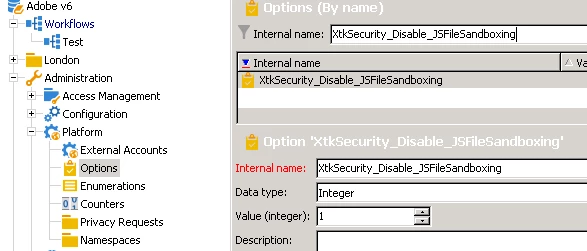
By default this option is not available OOTB, you must navigate to  Administration\Platform\Options and create the option, set the data type to integer and the value to 1. This will allow you to access files from folders outside the permitted folders (var,sftp temp)

As per documentation https://docs.campaign.adobe.com/doc/AC/en/INS_Appendices_Configuring_Campaign_options.html

XtkSecurity_Disable_JSFileSandboxing

If 1 is selected, this option disable the file sandboxing withing Javascript.

https://www.linkedin.com/in/david-garcia-uk/ | https://martech.network

5 replies

geoffreyl240454
Level 3
Apr 5, 2019 8:12 AM UTC

Hi Johanna,

This code is working on my side.

I think that you must control the rights granted to this folder.

Thanks,

Geoffrey.

Translate
Adobe Employee
Apr 5, 2019 8:22 AM UTC

There was a change in 8947 on file access for new installations.

It also states option  XtkSecurity_Disable_JSFileSandboxing to disable new handling

See https://docs.campaign.adobe.com/doc/AC/en/RN.html

Translate
david--garcia
david--garciaAccepted solution
Level 10
Apr 6, 2019 1:32 AM UTC

By default this option is not available OOTB, you must navigate to  Administration\Platform\Options and create the option, set the data type to integer and the value to 1. This will allow you to access files from folders outside the permitted folders (var,sftp temp)

As per documentation https://docs.campaign.adobe.com/doc/AC/en/INS_Appendices_Configuring_Campaign_options.html

XtkSecurity_Disable_JSFileSandboxing

If 1 is selected, this option disable the file sandboxing withing Javascript.

Translate
https://www.linkedin.com/in/david-garcia-uk/ | https://martech.network
Adobe Employee
Nov 5, 2020 6:12 AM UTC
worked, thnks
Translate
Jonathon_wodnicki
Community Advisor
Community Advisor
Mar 8, 2021 9:25 PM UTC

Hi,


If you want to keep the sandboxing while also allowing access to that folder, set <dataStore extraSandboxedDirectories="C:\Processing"/> in instance conf:


Thanks,

-Jon

Translate