Can we customize another system language in ACC | Community
Skip to main content
May 12, 2023
Solved

Can we customize another system language in ACC

  • May 12, 2023
  • 2 replies
  • 844 views

Besides default English, ACC still has French, German and Japanese.

Could we add another UI language by ourselves?

This post is no longer active and is closed to new replies. Need help? Start a new post to ask your question.
Best answer by ParthaSarathy

Hi @michellel1140 ,

By default ACC have support to English, French, German and Japanese.

But for other languages, Yes you can manually modify few of the UI like delivery, campaign, recipient etc inside console.

Example, If you want to modify delivery form UI in custom language, for the fields like label, internal name, delivery code etc either you can modify it to custom language in delivery data schema by modifying 'Label' of the particular attribute, or you can modify the label of it in Delivery input form.

And for other words/sentences like General, Analysis, Typology etc in tabs, you can modify it in delivery input form.
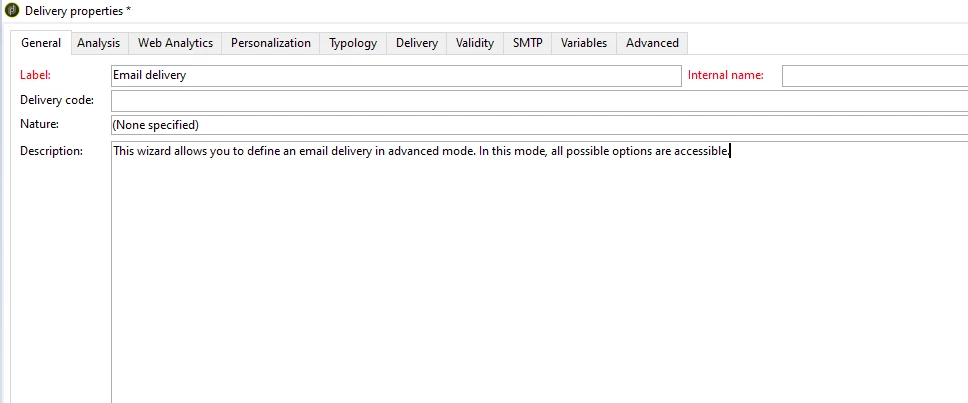
 

Similar way, you can utilize data schema and input forms to modify rest of the UI.

2 replies

LakshmiPravallika
Community Advisor
Community Advisor
May 12, 2023

Hi @michellel1140 


ACC UI Can be set to  French, German and Japanese if the client console and the server must be set with the same language(ie, if you want to have French UI, the server also must be set to French Language). It also means that each Campaign instance can only run in one language as per server language what we setup.


Also, PFA the documentation link


https://experienceleague.adobe.com/docs/campaign-classic/using/getting-started/starting-with-adobe-campaign/faq/faq-campaign-config.html?lang=en


Regards,

Pravallika.

ParthaSarathy
Community Advisor
ParthaSarathyCommunity AdvisorAccepted solution
Community Advisor
May 12, 2023

Hi @michellel1140 ,

By default ACC have support to English, French, German and Japanese.

But for other languages, Yes you can manually modify few of the UI like delivery, campaign, recipient etc inside console.

Example, If you want to modify delivery form UI in custom language, for the fields like label, internal name, delivery code etc either you can modify it to custom language in delivery data schema by modifying 'Label' of the particular attribute, or you can modify the label of it in Delivery input form.

And for other words/sentences like General, Analysis, Typology etc in tabs, you can modify it in delivery input form.


Similar way, you can utilize data schema and input forms to modify rest of the UI.

~  ParthaSarathy S~  Click here to join ADOBE CAMPAIGN USER GROUP for Quarterly In-person | Hybrid | Virtual Meetups