Level 2
Feb 11, 2021 3:04 PM UTC
Solved

Can use JavaScript to set an expiration date for list updates?

Hello.


Can use JavaScript to set an expiration date for list update activity?


I want to set when updating the workflow list without using Explorer.


Thank you.


This post is no longer active and is closed to new replies. Need help? Start a new post to ask your question.
DebTrAccepted solution
Level 6
Feb 25, 2021 7:28 PM UTC

Hi,

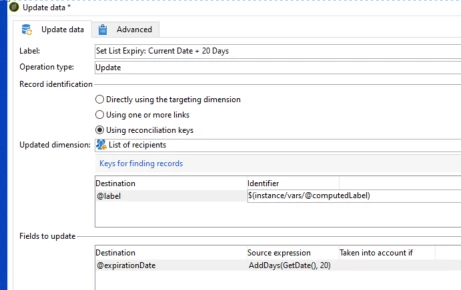
You can use the update data activity after the list creation to set the expiry date.

In case you want to have a computed label for your List,

1.you can store it in a instance variable first

2. set the label using instance variable.

3. set expiry date using a update data activity as per the following.


Thanks,

Deb

12 replies

DavidKangni
Adobe Champion and Community Advisor
Feb 12, 2021 3:46 PM UTC

Yes You can set this up. Just create a workflow that read list table and select list without expiration date and update them with a data update activity.

Thanks,

David

Translate
David Kangni
uz2020Author
Level 2
Feb 16, 2021 2:35 PM UTC

@davidkangniThank you for your reply. Does that mean selecting "Delete" for "Record identification"? I want to delete unnecessary lists after the scheduled time. Thank you.

Translate
DebTrAccepted solution
Level 6
Feb 25, 2021 7:28 PM UTC

Hi,

You can use the update data activity after the list creation to set the expiry date.

In case you want to have a computed label for your List,

1.you can store it in a instance variable first

2. set the label using instance variable.

3. set expiry date using a update data activity as per the following.


Thanks,

Deb

Translate
uz2020Author
Level 2
Mar 2, 2021 3:40 AM UTC
@debtr Thank you for your reply! Sorry for the late confirmation. What is a "list calculation label"? Is it the "Internal Name" of list? Thank you.
Translate
Level 6
Apr 19, 2023 12:39 PM UTC

Can you try using nms:group instead of what you are using in "updated dimension" and run the workflow?

Thanks,

Deb

Translate
Level 2
Apr 27, 2023 7:10 PM UTC

Hi Deb, I selected what you have above and when it populates it in the Updated dimension it's the same as what you have above ("List of recipients"). Same error. Thanks, Cindy

Translate