Campaign package local download | Community
Skip to main content
Level 5
May 17, 2023
Solved

Campaign package local download

  • May 17, 2023
  • 1 reply
  • 1502 views

Hi Everyone,

We are working on a back up strategy and looking for some assistance on how to save the resulting package into local directory (personal directory not on server disk) in an Adobe managed instance. However, I could not find any way to download it into my laptop's C drive. However, from the UI, package export window, we can browse our loca directory and download it locally.

So have anyone tried on this?


Your input is much appreciated!
This post is no longer active and is closed to new replies. Need help? Start a new post to ask your question.
Best answer by david--garcia

Is this what you are after?


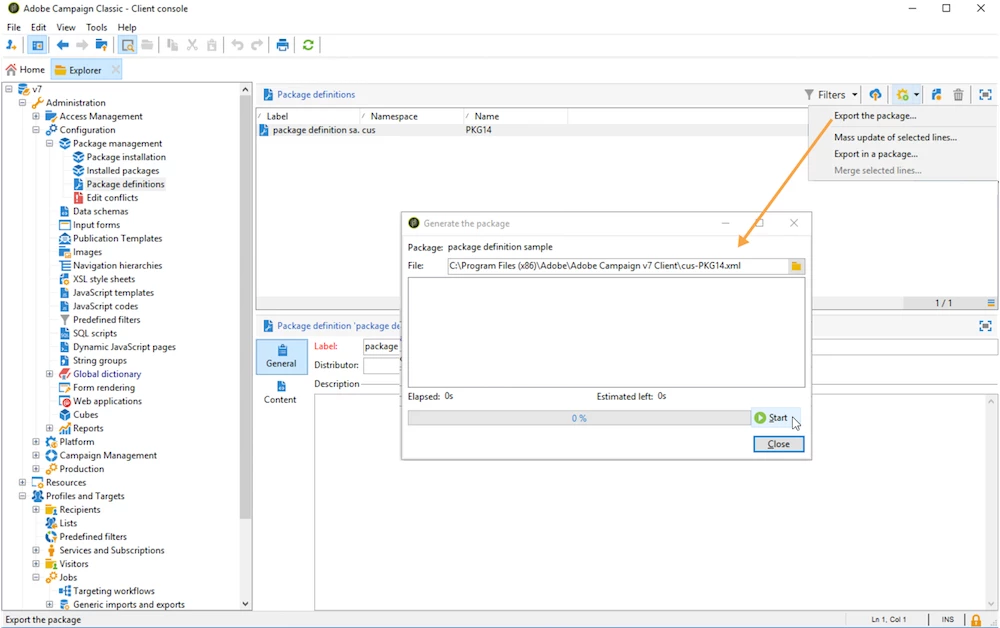
Export packages from a package definition

To export a package from a package definition, follow the steps below:

  1. Select the package definition to export, then click the Actions button and select Export the package.

  2. An XML file corresponding to the exported package is selected by default. It is named according to the package definition namespace and name.

  3. Once the package name and location defined, click the Start button to launch the export.


    https://experienceleague.adobe.com/docs/campaign-classic/using/getting-started/administration-basics/working-with-data-packages.html?lang=en

1 reply

david--garcia
david--garciaAccepted solution
Level 10
May 17, 2023

Is this what you are after?


Export packages from a package definition

To export a package from a package definition, follow the steps below:

  1. Select the package definition to export, then click the Actions button and select Export the package.

  2. An XML file corresponding to the exported package is selected by default. It is named according to the package definition namespace and name.

  3. Once the package name and location defined, click the Start button to launch the export.


    https://experienceleague.adobe.com/docs/campaign-classic/using/getting-started/administration-basics/working-with-data-packages.html?lang=en
Level 5
May 17, 2023

Thank you @david--garcia , I just want this process to be automated. I have a code which is taking the export of the package but storing in the campaign server disk. I am looking for a way to download that into my own machine

david--garcia
Level 10
May 17, 2023

I don't think thats possible, how about from your server to github repo? following is a tutorial.


https://blog.floriancourgey.com/2020/03/adobe-campaign-to-git