blank file getting attach in email delivery | Community
Skip to main content
Level 2
January 15, 2021
Solved

blank file getting attach in email delivery

  • January 15, 2021
  • 2 replies
  • 2836 views

Hi Team,


In one scenario, we are exporting the transition data in the CSV file on the server & attaching the same file in the email delivery for reporting purposes. But sometimes we are getting blank CSV files. the exported file has data present on the server. Can you please help me with this?


Below is the screenshot of the workflow.
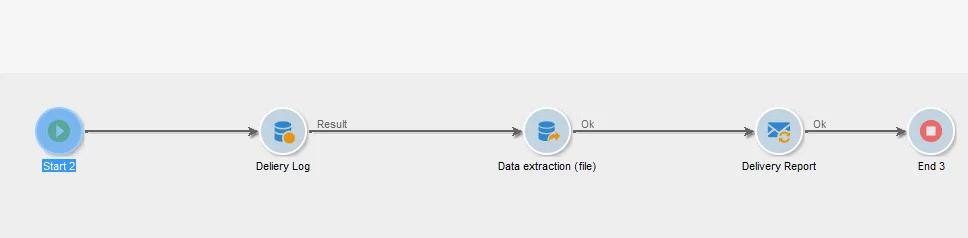
 

Also, attaching the path where we are exporting the CSV file.

/user/local/neolane/nl6/var/<instance name>/export/report.csv


Regards,

Amit

This post is no longer active and is closed to new replies. Need help? Start a new post to ask your question.
Best answer by saurav_pincha

Yes, we had to fix the file name being generated. Add the path with static file name in the attachment and in the advanced tab select script to rename the file as needed.

2 replies

Craig_Thonis
Adobe Employee
Adobe Employee
January 19, 2021

Hi Amit,


Can you check the last modified date on the CSV file and when the email was originally prepared?  It's possible that if the delivery preparation kicked off while the CSV was still being written to that it wasn't able to attach the data.


Can you also let us know if there is any consistency with the size of the files that get attached successfully versus those that show up blank?  It might be that the file size is too large.


Regards,

Craig

Level 2
January 20, 2021

Hi Craig,


Thanks for your reply. I have checked the last modified for CSV on the server & email preparation date. Email preparation date is greater than CSV last modified date by 30 Sec. 


Also, the size of the file is below 100KB.


Thanks,

Amit

Level 2
February 9, 2022

@craig_thonis  @sukrity_wadhwa Is this resolved?? We are facing the same issue. 


We even added a wait of 5 minutes before preparing the delivery to ensure the files are prepared but even that does not seem to work.

The logs shows the size of the file correctly but the email comes with a blank file.


Thank you

Saurav

September 28, 2022

@saurav_pincha @amits36558199 @sukrity_wadhwa 


Were you able to find out the solution for this?


Thanks!

saurav_pinchaAccepted solution
Level 2
September 28, 2022

Yes, we had to fix the file name being generated. Add the path with static file name in the attachment and in the advanced tab select script to rename the file as needed.