Automated A/B testing selecting the incorrect audience | Community
Skip to main content
November 1, 2022
Solved

Automated A/B testing selecting the incorrect audience

  • November 1, 2022
  • 1 reply
  • 735 views

I am using the workflow and javascript in the online documentation here:
https://experienceleague.adobe.com/docs/campaign-classic/using/sending-messages/a-b-testing/use-case/a-b-testing-uc-script.html?lang=en

as a basis for setting up automated A/B testing using CTR as the indicator.


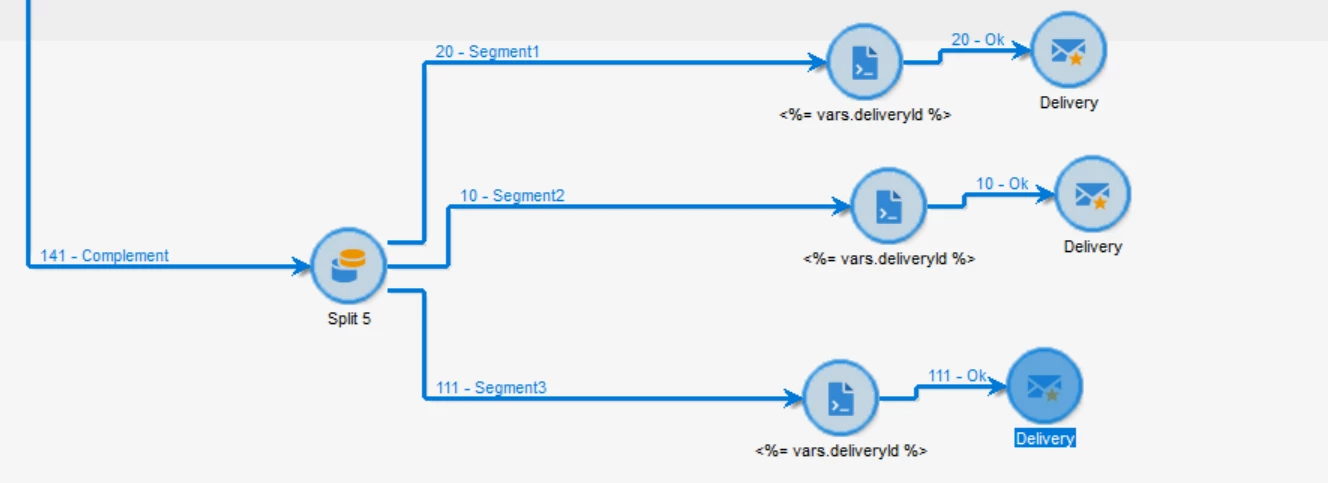
I have a requirement to split the winning delivery into multiple deliveries using a segment value.  The workflow looks like it's working correctly and is splitting the segments with the correct record counts in each path.  However, the audience in each delivery ends up the SAME audience - not just counts, but actual recipients.  In the screenshot below the "Segment2" audience is used for all 3.

Workflow:
Deliveries:



This post is no longer active and is closed to new replies. Need help? Start a new post to ask your question.
Best answer by mg6

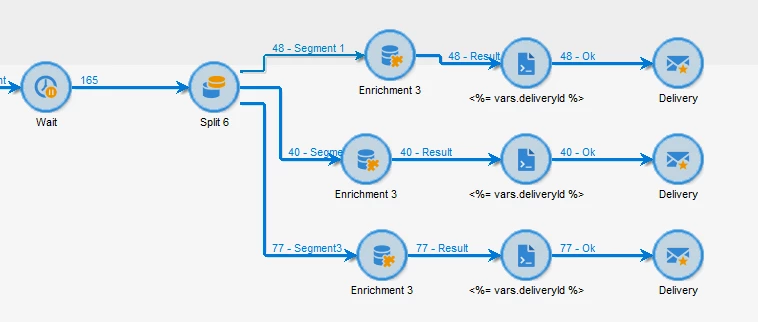
I have fixed this myself.  The solution was to add an empty enrichment activity after each split/segmentation path.  This seems to force Campaign to create and use a new working table instead of the table from before the split (which is what SEEMS to be the cause of the issue).

Updated WF:


Updated deliveries:

1 reply

mg6AuthorAccepted solution
November 9, 2022

I have fixed this myself.  The solution was to add an empty enrichment activity after each split/segmentation path.  This seems to force Campaign to create and use a new working table instead of the table from before the split (which is what SEEMS to be the cause of the issue).

Updated WF:


Updated deliveries: