Authorized addresses in urlPermission | Adobe Higher Education
Skip to main content
Level 2
December 14, 2021
Risolto

Authorized addresses in urlPermission

  • December 14, 2021
  • 1 risposta
  • 2200 visualizzazioni

Hello Adobe Campaing Community
I have an issue to acces an external url in javascript code 
I get this error 

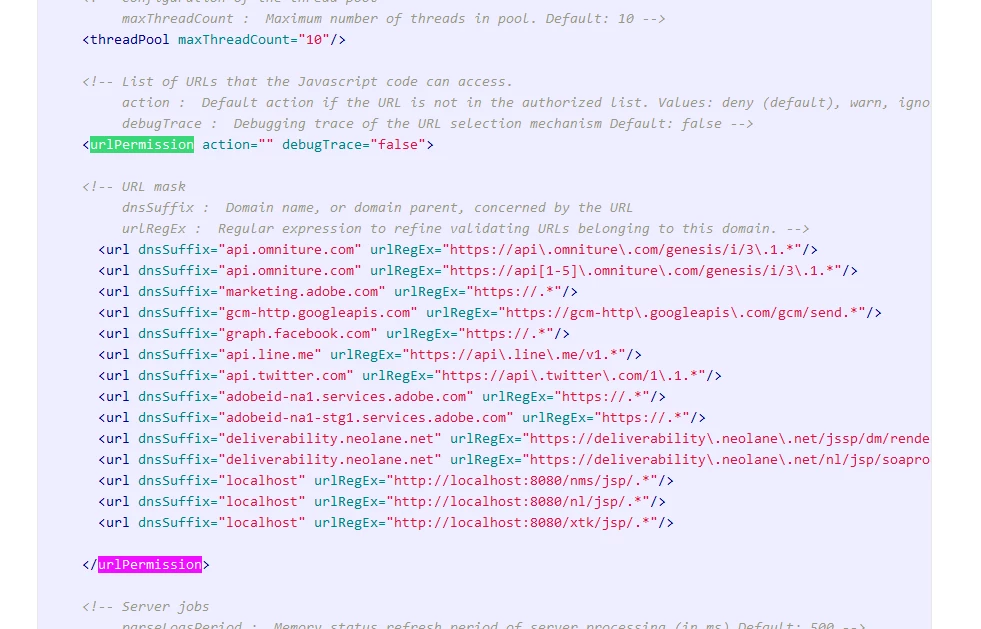
the script is trying to access is not part of the authorized addresses in urlPermission (serverconf.xml)

 I m on sandbox instance I have  tried to find the serverconf.xml to add the url that I want to use but I could'nt find any option to do it
Any suggestions ? 
Thanks 

Questo argomento è stato chiuso alle risposte.
Migliore risposta di david--garcia

The location path of the serverconf varies depending on version and Operating System, but look for it somewhere in

config<instance>.xml or serverConf.xml


C:\Program Files (x86)\Adobe Campaign\Adobe Campaign v7\conf (windows)
/usr/local/neolane/nl6/conf/ng/ (linux)

you need to whitelist the domain/ip you are connecting to in the section mentioned


Here are some support references

  1. https://experienceleague.adobe.com/docs/campaign-classic/using/installing-campaign-classic/additional-configurations/url-permissions.html?lang=en
  2. https://blog.floriancourgey.com/2018/10/get-the-content-of-your-serverconf-xml-in-adobe-campaign/
  3. https://experienceleague.adobe.com/docs/campaign-classic/using/installing-campaign-classic/additional-configurations/configuring-campaign-server.html?lang=en
  4. https://blog.floriancourgey.com/2018/06/make-http-calls-in-js-in-adobe-campaign

1 risposta

david--garcia
Level 10
December 14, 2021

The location path of the serverconf varies depending on version and Operating System, but look for it somewhere in

config<instance>.xml or serverConf.xml


C:\Program Files (x86)\Adobe Campaign\Adobe Campaign v7\conf (windows)
/usr/local/neolane/nl6/conf/ng/ (linux)

you need to whitelist the domain/ip you are connecting to in the section mentioned


Here are some support references

  1. https://experienceleague.adobe.com/docs/campaign-classic/using/installing-campaign-classic/additional-configurations/url-permissions.html?lang=en
  2. https://blog.floriancourgey.com/2018/10/get-the-content-of-your-serverconf-xml-in-adobe-campaign/
  3. https://experienceleague.adobe.com/docs/campaign-classic/using/installing-campaign-classic/additional-configurations/configuring-campaign-server.html?lang=en
  4. https://blog.floriancourgey.com/2018/06/make-http-calls-in-js-in-adobe-campaign
https://www.linkedin.com/in/david-garcia-uk/ | https://martech.network
WiznamoAutore
Level 2
December 14, 2021

Thank you David for the response
it's all clear for me but I have one issue that I didn't find the configuration file in the specified folder 

C:\Program Files (x86)\Adobe Campaign\Adobe Campaign v7\conf (windows)

 Here is what I found in the installation directory 


david--garcia
Level 10
December 14, 2021

look for it using the search function, can't remember exactly which folder. "serverConf"

https://www.linkedin.com/in/david-garcia-uk/ | https://martech.network