Audit instance variables without logInfo() | Community
Skip to main content
This post is no longer active and is closed to new replies. Need help? Start a new post to ask your question.
Best answer by ParthaSarathy

Hi @heku_ ,

Once the workflow ran, Refresh the console, go to workflow property > Variables tab, Here you can find the instance variable values.

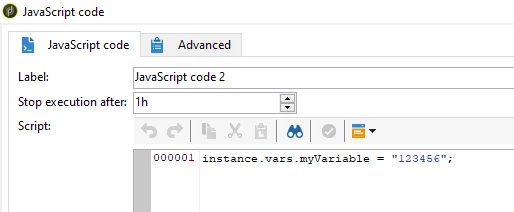
Example, in a JS, I had created an instance variable

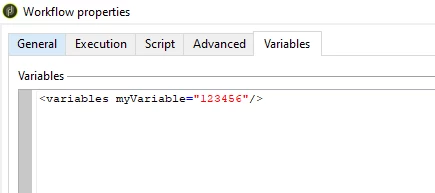
After running the WKF and refreshing the console, In workflow property > Variables tab, we can find the instance variable name and its value.


1 reply

ParthaSarathy
Community Advisor
ParthaSarathyCommunity AdvisorAccepted solution
Community Advisor
May 2, 2023

Hi @heku_ ,

Once the workflow ran, Refresh the console, go to workflow property > Variables tab, Here you can find the instance variable values.

Example, in a JS, I had created an instance variable

After running the WKF and refreshing the console, In workflow property > Variables tab, we can find the instance variable name and its value.


~  ParthaSarathy S~  Click here to join ADOBE CAMPAIGN USER GROUP for Quarterly In-person | Hybrid | Virtual Meetups