Level 2
April 22, 2021
Solved

"Alert" Activity - How to configure "sender Name/Sender email address?

Hi all, 

In Adobe campaign classic I have WF using Alert acivity and purpose to send email to some user but I need to see where can I setup / configure (Sender's name : for example : Company Name<no-reply@companydomain.com) )

Can anyone let me know.


thanks in advnace.


Regards

CSLTGupta
This post is no longer active and is closed to new replies. Need help? Start a new post to ask your question.
Amit_ShindeAccepted solution
Level 3
April 23, 2021

Hi @csltguptaa,


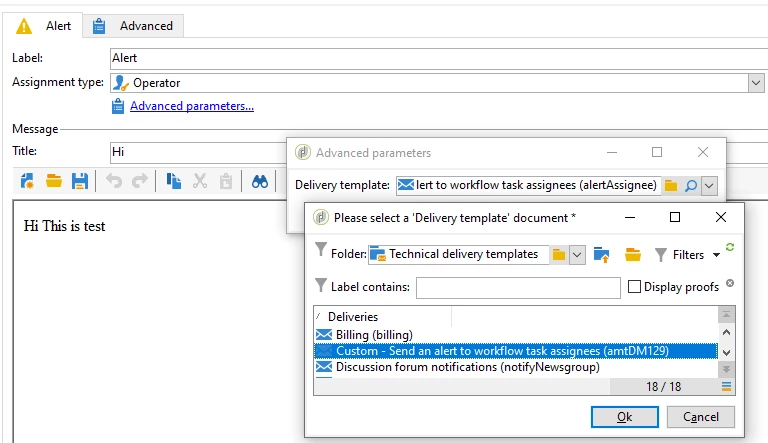
By default, it will take email header parameters configured in the deployment wizard. If you want to use the different email headers than the default one then follow the below steps.


1. Go to Administration>Campaign Management>Technical delivery templates & duplicate the native template(Send an alert to workflow task assignees)


2. Change the email header details & save.


3.  In Alert activity(Advanced parameters), change the delivery templates from native template to custom created template


Regards,

Amit


2 replies

Amit_ShindeAccepted solution
Level 3
April 23, 2021

Hi @csltguptaa,


By default, it will take email header parameters configured in the deployment wizard. If you want to use the different email headers than the default one then follow the below steps.


1. Go to Administration>Campaign Management>Technical delivery templates & duplicate the native template(Send an alert to workflow task assignees)


2. Change the email header details & save.


3.  In Alert activity(Advanced parameters), change the delivery templates from native template to custom created template


Regards,

Amit


Translate
Sukrity_Wadhwa
Level 4
April 29, 2021

Hi @csltguptaa,

Was the given solution helpful to resolve your query? Do let us know.

Thanks!

Translate
Sukrity Wadhwa