AEM to Adobe Campaign internal JS library error | Community
Skip to main content
Marcel_Szimonisz
Community Advisor
Community Advisor
September 7, 2021
Solved

AEM to Adobe Campaign internal JS library error

  • September 7, 2021
  • 1 reply
  • 1121 views

Hello All,

I have come across this error when having integrated AEM to Adobe Campaign

Cannot parse XTK Date+Time 'undefined': not a valid XTK value
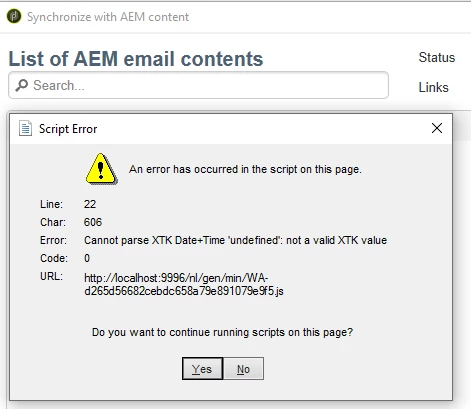


When I look up the file on the server this is basically the web app libraries  (jquery, ...)


I can actually get the list of templates from AEM when playing with the filter


Thank you very much for any hint,

Marcel

 

This post is no longer active and is closed to new replies. Need help? Start a new post to ask your question.
Best answer by Manoj_Kumar

Hello @marcel_szimonisz 


According to this page. There is some outdated Adobe campaign information on AEM instance.

Solve this issue by removing all campaign integration configurations that are on AEM and rebuilding them. Then, create a new template.


1 reply

Manoj_Kumar
Community Advisor
Manoj_KumarCommunity AdvisorAccepted solution
Community Advisor
September 7, 2021

Hello @marcel_szimonisz 


According to this page. There is some outdated Adobe campaign information on AEM instance.

Solve this issue by removing all campaign integration configurations that are on AEM and rebuilding them. Then, create a new template.


Manoj  | https://themartech.pro
Marcel_Szimonisz
Community Advisor
Community Advisor
September 7, 2021

Ou you are right. I should have just google it. Anyway lets see

If you get a ‘Cannot parse XTK Date+Time ‘undefined’’ error After clicking Synchronize, you get an error that a script on the pages has occured: Cannot parse XTK Date+Time ‘undefined’: not a valid XTK value. This happens if there is still outdated Adobe Campaign information on the AEM instance. Solve this issue by removing all campaign integration configurations that are on AEM and rebuilding them. Then, create a new template.