Adressing hard bounces -- campaign selection | Community
Skip to main content
Best answer by ParthaSarathy

Hi @jkkkkkkkkkkkkkkkkk ,

Have targeting and filtering dimension in Query as nms:address, and apply the below filter to fetch Hard bounce records,

@quarantineReason is included in 4,8,20,3,1

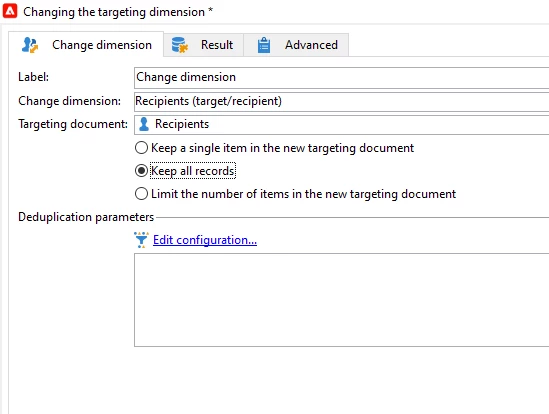
After Query, using change dimension activity, change the targeting dimension as nms:recipients,

Post this, you can change dimension to your app Subscription table and send Push deliveries.

1 reply

ParthaSarathy
Community Advisor
ParthaSarathyCommunity AdvisorAccepted solution
Community Advisor
March 10, 2025

Hi @jkkkkkkkkkkkkkkkkk ,

Have targeting and filtering dimension in Query as nms:address, and apply the below filter to fetch Hard bounce records,

@quarantineReason is included in 4,8,20,3,1

After Query, using change dimension activity, change the targeting dimension as nms:recipients,

Post this, you can change dimension to your app Subscription table and send Push deliveries.

~  ParthaSarathy S~  Click here to join ADOBE CAMPAIGN USER GROUP for Quarterly In-person | Hybrid | Virtual Meetups
Level 2
March 10, 2025

Hi @parthasarathy 
Thank you, but how do I get there? 

Craig_Thonis
Adobe Employee
Adobe Employee
March 10, 2025

Hi JK,

If you mean how do you get to the schema or the non-deliverables and addresses section please check out the documentation below:


Using non-deliverables and addresses section:

https://experienceleague.adobe.com/en/docs/campaign-classic/using/sending-messages/monitoring-deliveries/understanding-quarantine-management


Schemas section (where to find nms:address schema):
https://experienceleague.adobe.com/en/docs/campaign-classic/using/configuring-campaign-classic/editing-schemas/data-schemas


Regards,

Craig