Adobe MC RT connection issue | Community
Skip to main content
June 2, 2020
Solved

Adobe MC RT connection issue

  • June 2, 2020
  • 2 replies
  • 4141 views

Team,


I am trying to call the Adobe MC Rt instance from my development environment using the PushEvents method and getting the below error.

rg.springframework.ws.client.WebServiceTransportException: Forbidden [403]


Here is the SoapRequest details which i get it from the log.


<SOAP-ENV:Envelope xmlns:SOAP-ENV="http://schemas.xmlsoap.org/soap/envelope/"><SOAP-ENV:Header/><SOAP-ENV:Body><ns2:PushEvents xmlns:ns2="urn:nms:rtEvent"><ns2:sessiontoken>mc/*****</ns2:sessiontoken><domEventCollection><Events><rtEvent email="myemail" type="test_template" wishedChannel="0"><ctx><enrollee>1234</enrollee><amount>12.56</amount></ctx></rtEvent></Events></domEventCollection></ns2:PushEvents></SOAP-ENV:Body></SOAP-ENV:Envelope>


The same request is working from  Localmachine, tested it via the soap client.


I reached out the Adobe Support team, and they mentioned this could be the issue with the IPwhitelisting and shared my server ip addresses with them and whitelisted in the RT instances.


Stil seeing the same issues.


Note: I don't think this is a network connectivity issues , because the token api is working but not the pushEvents.


I have created a support ticket with P1 priority and Adobe support team is work on it for the last 4 days.

Appreciate your help on this.
This post is no longer active and is closed to new replies. Need help? Start a new post to ask your question.
Best answer by DavidKangni

HI,


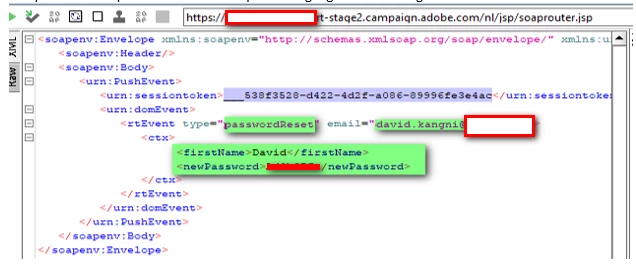
instead of using mc and password, please use the session token as below.

Thanks

David

2 replies

DavidKangni
Community Advisor
DavidKangniCommunity AdvisorAccepted solution
Community Advisor
June 2, 2020

HI,


instead of using mc and password, please use the session token as below.

Thanks

David

David Kangni
Jyoti_Yadav
Level 8
June 3, 2020

Hi,

 You need to provide sessionToken instead of username/password combination, if in your <config> file,
<securityZone allowDebug="true" allowHTTP="false" allowSQLInjection="false" label="Private Network (VPN)"
name="vpn" showErrors="true" allowUserPassword="false">


allowUserPassword= helps you to pass user/password combination.


Thanks.


sbalustarAuthor
June 5, 2020

@jyoti_yadav , Thank for your response. This is the issue with IPWhitelisting and Adobe support team have not done it properly.


I have a one more questions. Adobe RT instance is throwing 403 Forbidden error for the below cases.

1)User Supplied Invalid token

2) Ipwhitelisting issues.


Is there a way to know the exact failure based on the Response message? The reason is if this is the issue with token, we will request for a new token and call the RtEvent api.