Adobe Campaign v7 - Setting some "Advanced parameters" options to be checked by default | Community
Skip to main content
New Member
April 9, 2025
Solved

Adobe Campaign v7 - Setting some "Advanced parameters" options to be checked by default

  • April 9, 2025
  • 1 reply
  • 674 views

Hi,

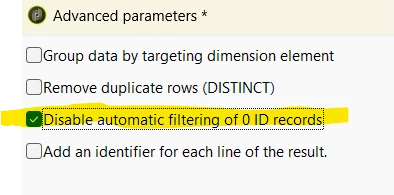
Is possible to set some "Advanced parameters" to be checked by default - especially "Disable automatic filtering of 0 ID records" ? When is not enabled sometimes it generate cartesian joins queries or queries with bad optimizer plans. 


regards

Best answer by SushantTrimukheD

@sushanttrimukhed 

first solution - it won't work - most of users uses Enrichment activity from painter.

second solution - we won't force  all Enrichments to have this option checked.


we would like to have it checked initially - even when someone will choose Enrichment from painter. If from any reason they want to enable filtering (unchecked box) then it will be fine.


Hi @bartoszgo ,

The only option would be then Schema Extension (Theoretical, Not Recommended).

You could theoretically extend the xtk:workflow schema or the Enrichment activity’s definition to modify its default behavior. However, this is not officially supported or documented for this purpose


  1. Extend the xtk:workflowActivity schema (or a related schema) to include default values for the Enrichment activity’s advanced parameters.
  2. Modify the XML definition to set the desired options as default.

Limitation: This is an unsupported customization that could break with upgrades or patches. Adobe Campaign’s core schemas are not intended to be modified for this type of use case, and it would require significant expertise and testing.

Thanks

Sushant Trimukhe
1 reply

SushantTrimukheD
Level 4
April 9, 2025
SushantTrimukheD
Level 4
April 9, 2025

@bartoszgo,

Maybe you can use the approach of creating Custom Workflow Template.

Create a custom workflow template that includes an Enrichment activity with the desired "Advanced parameters" options per-checked. Users can then start their workflows from this template instead of a blank workflow.

Or

Another approach involves using JavaScript within a workflow to automatically modify the properties of an Enrichment activity after it’s added. However, this would require a custom implementation and isn’t a built-in feature

Thanks

Sushant Trimukhe

BartoszGoAuthor
New Member
April 9, 2025

@sushanttrimukhed 

first solution - it won't work - most of users uses Enrichment activity from painter.

second solution - we won't force  all Enrichments to have this option checked.


we would like to have it checked initially - even when someone will choose Enrichment from painter. If from any reason they want to enable filtering (unchecked box) then it will be fine.