adobe campaign - Image hosting location issue | Community
Skip to main content
Level 2
July 20, 2021
Solved

adobe campaign - Image hosting location issue
  • July 20, 2021
  • 9 replies
  • 4707 views


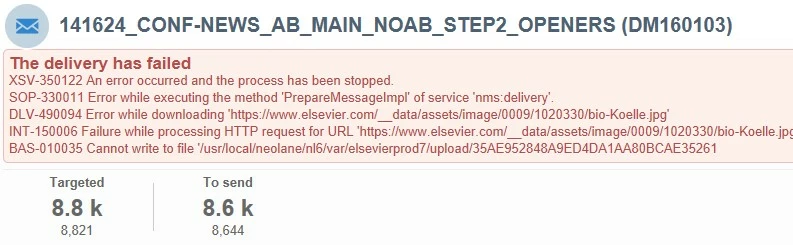
We get the above instance from the Adobe campaign team to all the existing images hosted on the location https://www.elsevier.com/__data/assets/image/.


however, if I re-upload the same images to the file repository http://media.journals.elsevier.com/content/files/, it resolves the issue. 


I am totally unaware of the Campaign execution, but I would like to avoid this double work just for HTMLs creation, is this something to do the configuration with Adobe campaign 7 to allow all urls?


Just thinking if the images uploaded to the host http://media.journals.elsevier.com/content/files/

can execute the campaign with a larger group of recipients, then the same image uploaded to https://www.elsevier.com/__data/assets/image/  should also be working, if the image is publically visible.


-Adobe campaign experts please advise


In few chances, we were successfully able to send something using images hosted on the location https://www.elsevier.com/__data/assets/image/ if we run tests/proofing. The issue is not definitely being caused by images hosted on the dataset location. Sometimes the mailings work with images from here, sometimes they don’t. It tends to be large-scale mailings that fail. The dataset image hosting location is the only common thread, so we are rehosting all the images.


do I have any solution to fix this issue that avoids double-work(re-hosting) of images

 

This post is no longer active and is closed to new replies. Need help? Start a new post to ask your question.
Best answer by Kishore_Padamata

Hello @priya_vinoth 
This is how it works, when you chose "upload images" in email delivery
During the preparation of delivery, the process will

- download the external image

- save in a local path

- upload the image from local path to public resources host

Now, referring to the error you are facing. It is failing at "Download the external image".

Few things to note, 
Downloading is not happening on the ACC client user PC (where you login to ACC client to manage operations).
Downloading is happening on the ACC server.

Meaning, ACC server should have access to the External Image.

Now, please check if the ACC server has access. I strongly believe, it doesn't.

And upon whitelisting the necessary network firewalls, give it a try. It should work as designed.


Hope this helps!

9 replies

Manoj_Kumar
Community Advisor
Community Advisor
July 20, 2021

Hello @priya_vinoth 


I just tried accessing the image given in your screenshot.  The URL is not accessible publicly. Maybe that is why Campaign was not able to download it from that particular domain.


and media.journals.elservier seems to be open to the public. That is why the images are working from this domain.


Manoj     Find me on LinkedIn
Level 2
July 21, 2021

Hi @_manoj_kumar_, thanks for the response, would you be able to view this link https://www.elsevier.com/__data/assets/image/0012/760989/marc-masen.jpg 


not just one image, all the live image, uploaded to above dataset location is not working with campaign execution

Manoj_Kumar
Community Advisor
Community Advisor
July 21, 2021
Yes, this URL is working for me.
Manoj     Find me on LinkedIn
Level 2
July 21, 2021

I have never worked with an adobe campaign, I believe the issue is not with hosting as a developer,
should the campaign team do further investigation from the Adobe Campaign 7 side, do they need to do any additional setting/configuration to allow those URLs.


Just thinking if the images uploaded to the host http://media.journals.elsevier.com/content/files/ can execute the campaign with a larger group of recipients, then the same image uploaded to https://www.elsevier.com/__data/assets/image/ should also be working, if the image is publically visible.


-Adobe campaign experts please advise

Manoj_Kumar
Community Advisor
Community Advisor
July 21, 2021
Yes, It should work only if the image is publicly visible/accessible.
Manoj     Find me on LinkedIn
Level 2
July 21, 2021
Hi Priya, even i am not able to access any of the links given except-https://www.elsevier.com/__data/assets/image/0012/760989/marc-masen.jpg. This usually happens whenever the links are not gone live/publicly hosted
Level 2
July 21, 2021
Manoj_Kumar
Community Advisor
Community Advisor
July 21, 2021
Yes, I am able to access this image now.
Manoj     Find me on LinkedIn
Level 2
July 21, 2021
Sukrity_Wadhwa
Community Manager
Community Manager
August 4, 2021

Hi @priya_vinoth,

Were you able to resolve this query or do you still need more help here? Do let us know.

Thanks!

Sukrity Wadhwa
Level 2
August 11, 2021

@sukrity_wadhwa Not able to resolve the issue, adobe still throws error while sending large -scale mailing list, however we found the host is not reating issue. we tested with 301 Redirect Checker | Check HTTP redirects and their response codes,


all the images under https://www.elsevier.com/__data are OK, not able to find the root cause, but i believe this is something to be fixed from adobe side.

Kishore_Padamata
Adobe Employee
Kishore_PadamataAdobe EmployeeAccepted solution
Adobe Employee
August 13, 2021

Hello @priya_vinoth 
This is how it works, when you chose "upload images" in email delivery
During the preparation of delivery, the process will

- download the external image

- save in a local path

- upload the image from local path to public resources host

Now, referring to the error you are facing. It is failing at "Download the external image".

Few things to note, 
Downloading is not happening on the ACC client user PC (where you login to ACC client to manage operations).
Downloading is happening on the ACC server.

Meaning, ACC server should have access to the External Image.

Now, please check if the ACC server has access. I strongly believe, it doesn't.

And upon whitelisting the necessary network firewalls, give it a try. It should work as designed.


Hope this helps!