Adobe Campaign Classic V7 Reporting | Community
Skip to main content
pradeep_07
Level 4
April 25, 2023
Solved

Adobe Campaign Classic V7 Reporting

  • April 25, 2023
  • 2 replies
  • 1123 views

Hi!

I am trying to extract the data of Delivery and tracking logs in Adobe Campaign classic V7.


Is there way we can select particular date range? Please suggest if any other way to get this data.


Thanks,


Pradeep

This post is no longer active and is closed to new replies. Need help? Start a new post to ask your question.
Best answer by ParthaSarathy

Hi @pradeep_07 ,

If you are trying to extract data in a workflow, then you can create query condition as below,

For extracting Delivery Logs (broadLog records), you can select broadLogRcp schema as targeting and filtering dimension, and select date range using @eventDate
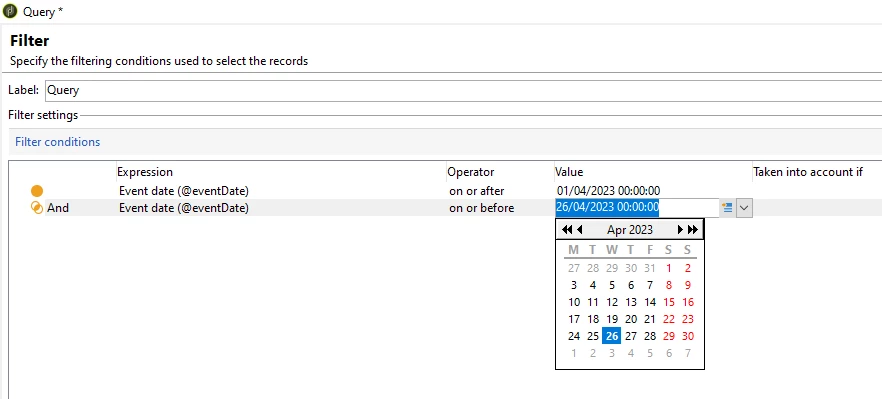
 

Above method, We are Hardcoding the date range as from 1st April to 26th April (static date range)

For extracting Tracking Logs, you can select trackingLogRcp schema as targeting and filtering dimension, and select date range using @logDate

Example, @logDate on or after DaysAgo(5)
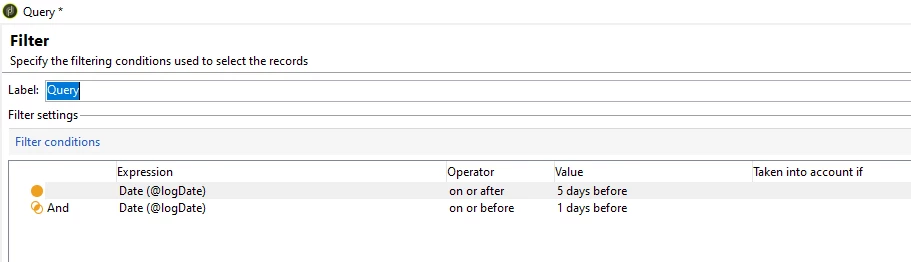
 

The above method of using DaysAgo() function will provide last 5 days to previous day record whenever the workflow runs.

And after each query, you can use data extraction activity and can generate a file.


2 replies

ParthaSarathy
Community Advisor
ParthaSarathyCommunity AdvisorAccepted solution
Community Advisor
April 26, 2023

Hi @pradeep_07 ,

If you are trying to extract data in a workflow, then you can create query condition as below,

For extracting Delivery Logs (broadLog records), you can select broadLogRcp schema as targeting and filtering dimension, and select date range using @eventDate


Above method, We are Hardcoding the date range as from 1st April to 26th April (static date range)

For extracting Tracking Logs, you can select trackingLogRcp schema as targeting and filtering dimension, and select date range using @logDate

Example, @logDate on or after DaysAgo(5)


The above method of using DaysAgo() function will provide last 5 days to previous day record whenever the workflow runs.

And after each query, you can use data extraction activity and can generate a file.


~  ParthaSarathy S~  Click here to join ADOBE CAMPAIGN USER GROUP for Quarterly In-person | Hybrid | Virtual Meetups

March 18, 2024

Hello,


Some points to be added in this :

1) If recurring delivery using in Campaign so use contact date.

2) If Continue delivery using in Automation so use Event date.
