Adobe Campaign Classic Read only users | Community
Skip to main content
Level 2
December 2, 2020
Solved

Adobe Campaign Classic Read only users

  • December 2, 2020
  • 2 replies
  • 4036 views

Hi Team,


Need to create an operator in Adobe Campaign Classic with Read only View to specific folders.


Can you suggest, as I dont see any Readonly access in NamedRights and Operator Groups


Thanks in advance..!

This post is no longer active and is closed to new replies. Need help? Start a new post to ask your question.
Best answer by prasannakumarmarru

Hi,


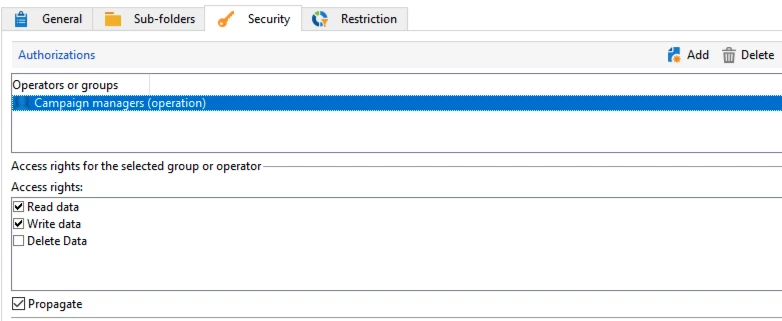
You need to go to the folders on which you need to give read only access to users and right click> open properties> go to security tab and add the group of users/ users in authorizations and select it and uncheck write and delete boxes. Make sure you select the group or user you want to modify the permissions for once you add in authorizations. You can also check propagate box if you would like to give same access to under lying folders. Thanks!


2 replies

prasannakumarmarru
prasannakumarmarruAccepted solution
Level 4
December 2, 2020

Hi,


You need to go to the folders on which you need to give read only access to users and right click> open properties> go to security tab and add the group of users/ users in authorizations and select it and uncheck write and delete boxes. Make sure you select the group or user you want to modify the permissions for once you add in authorizations. You can also check propagate box if you would like to give same access to under lying folders. Thanks!


kvthiyagaAuthor
Level 2
December 2, 2020

Hi Prasanna,


Thanks for the reply. I tried this approach before hand but the problem is when I login with that user I don't see any folder in explorer (even the given read only folder).


Just wondering do I need to give any "operator group" or "Named Right" first assigned to that user afterwards folder level RO access will work?


Pls share your thoughts.

Sukrity_Wadhwa
Community Manager
Community Manager
December 7, 2020

Hi @kvthiyaga,

Were you able to resolve this query or do you still need more help here? Do let us know.

Thanks!

Sukrity Wadhwa
kvthiyagaAuthor
Level 2
December 7, 2020
Hi Sukrity,