Adobe Campaign Classic - Client Console Error - Error creating the cookie (Windows error code: 12005) | Community
Skip to main content
March 11, 2021
Solved

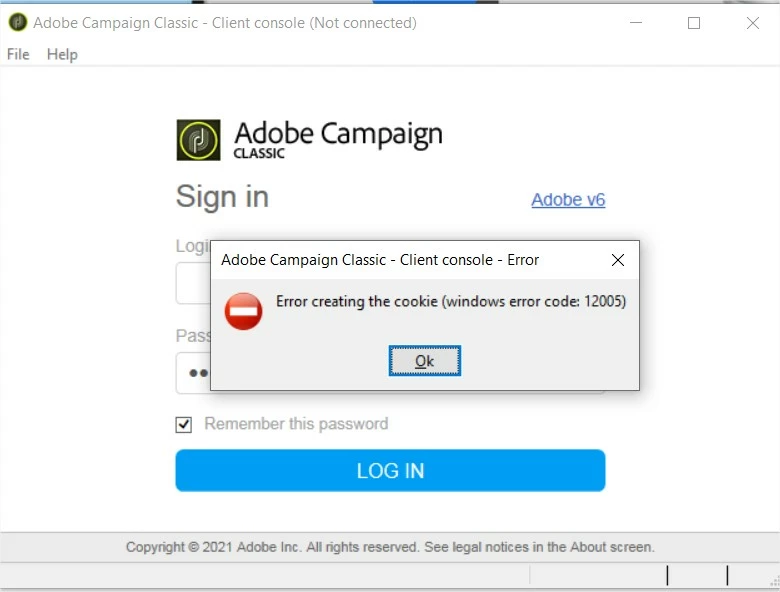
Adobe Campaign Classic - Client Console Error - Error creating the cookie (Windows error code: 12005)

  • March 11, 2021
  • 2 replies
  • 3254 views

Hello Everyone!

Can someone help on this case?

As we're trying to connect on Adobe Campaign but having this error 

Adobe Campaign Classic - Client Console Error - Error creating the cookie (Windows error code: 12005)

This post is no longer active and is closed to new replies. Need help? Start a new post to ask your question.
Best answer by Craig_Thonis

Hi Bob,

It looks like we've seen this a few times in the past with IMS logins when there is a cache corruption for the console.  Can you attempt the following steps and let us know if you can log in?


1. Go to %appdata% directory on the windows machine ( the path will be C:\Users\[YOUR USERNAME]\AppData\Roaming ) 

2. Then look for the Neolane folder 

3. Either delete all contents OR rename it to something like neolane.old (renaming is better as the client will create a new folder anyways on the next launch) 

4. Uninstall and reinstall the client console again with admin creds and try logging in again.

5. Try to login using federated ID after this change.


Regards,

Craig
2 replies

Craig_Thonis
Adobe Employee
Craig_ThonisAdobe EmployeeAccepted solution
Adobe Employee
March 11, 2021

Hi Bob,

It looks like we've seen this a few times in the past with IMS logins when there is a cache corruption for the console.  Can you attempt the following steps and let us know if you can log in?


1. Go to %appdata% directory on the windows machine ( the path will be C:\Users\[YOUR USERNAME]\AppData\Roaming ) 

2. Then look for the Neolane folder 

3. Either delete all contents OR rename it to something like neolane.old (renaming is better as the client will create a new folder anyways on the next launch) 

4. Uninstall and reinstall the client console again with admin creds and try logging in again.

5. Try to login using federated ID after this change.


Regards,

Craig

bob92Author
March 11, 2021

Hello Craig,

Thank for you attention on this.

I closed this topic as this is already resolved.

The problem was resolved after unchecking this "Connect with an Adobe ID"

Thanks for the response. and additional tips.

🙂