Adobe campaign Classic Access | Community
Skip to main content
This post is no longer active and is closed to new replies. Need help? Start a new post to ask your question.
Best answer by ParthaSarathy

Hi @ashwinibh ,

Assign the operator to 'Access to reports' Operator Group.

Alternatively, you can also try below steps,

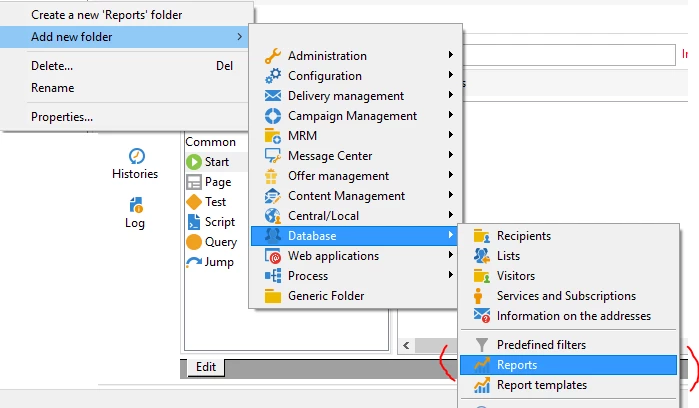
Step1: Create a report folder


Step-2: Add the operator /operator group to the folder

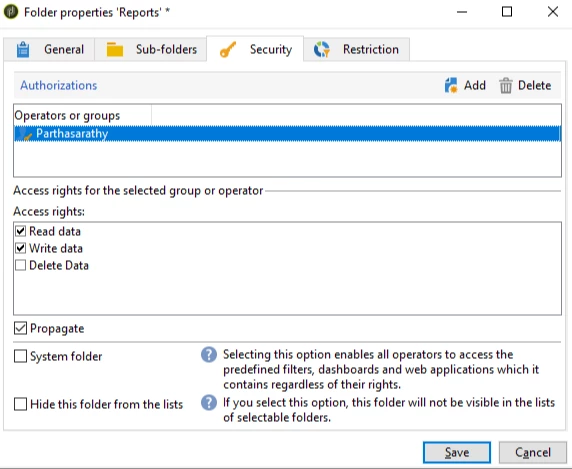
Right click the report folder > property > Security tab > add the operator or operator group that you want to assign 'Write' (Create) access.

Now 'select' the operator, and below in 'Access Rights:' check the 'Write data' check box.


3 replies

ParthaSarathy
Community Advisor
ParthaSarathyCommunity AdvisorAccepted solution
Community Advisor
August 25, 2023

Hi @ashwinibh ,

Assign the operator to 'Access to reports' Operator Group.

Alternatively, you can also try below steps,

Step1: Create a report folder


Step-2: Add the operator /operator group to the folder

Right click the report folder > property > Security tab > add the operator or operator group that you want to assign 'Write' (Create) access.

Now 'select' the operator, and below in 'Access Rights:' check the 'Write data' check box.


~  ParthaSarathy S~  Click here to join ADOBE CAMPAIGN USER GROUP for Quarterly In-person | Hybrid | Virtual Meetups
LakshmiPravallika
Community Advisor
Community Advisor
August 25, 2023

Hi @ashwinibh ,


If the access needs to be given on Operator Level for creating reports, Please go to the Path "/Administration/Access Management/Operators/" and select the required Operator and Go to the "Edit" Tab after opening the Operator and go to "Access Rights" Tab and then select the below Operator Group (Access to Reports) and save this.


Regards,

Pravallika.

akshaaga
Adobe Employee
Adobe Employee
August 26, 2023

@ashwinibh ,

Access to a report depends on its selection type, display conditions, and access authorizations.

You can go through the following doc for reference-

https://experienceleague.adobe.com/docs/campaign-classic/using/reporting/creating-new-reports/configuring-access-to-the-report.html?lang=en