This post is no longer active and is closed to new replies. Need help? Start a new post to ask your question.
ParthaSarathy
ParthaSarathyAccepted solution
Community Advisor
May 27, 2024 12:39 PM UTC

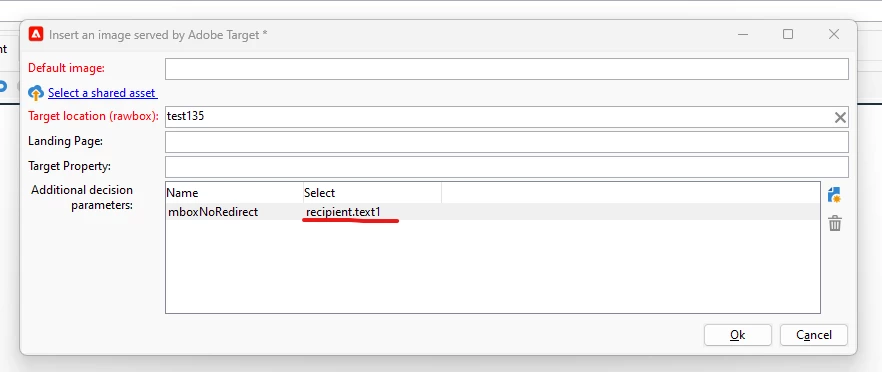
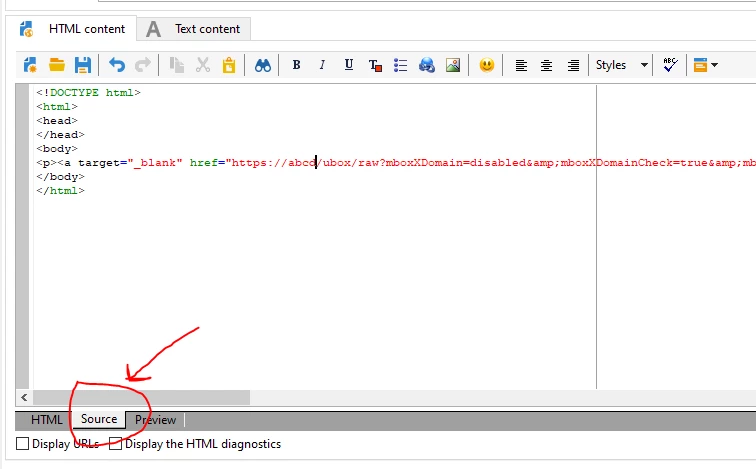
@michael_soprano , After adding all the parameters in 'Insert an image using Adobe target' window, click on Ok, and click on Source tab below and make the modification (go to source tab and search for &amp;mboxNoRedirect=<%= recipient.text1%>&amp;

Replace <%= recipient.text1%> with 1)

~  ParthaSarathy S

4 replies

ParthaSarathy
Community Advisor
Community Advisor
May 27, 2024 12:17 PM UTC

Hi @michael_soprano ,

By default, you can able to select field from target mapping's schema.

You can try this, select recipient.text1 as shown in the image, and go to source tab and search for &amp;mboxNoRedirect=<%= recipient.text1%>&amp;

Replace <%= recipient.text1%> with 1

Translate
~  ParthaSarathy S
Michael_Soprano
Level 10
May 27, 2024 12:24 PM UTC

Would you be so kind and share some screenshots? 

Unfortunately I am not advanced in Campaign ...

Translate
ParthaSarathy
Community Advisor
ParthaSarathyCommunity AdvisorAccepted solution
Community Advisor
May 27, 2024 12:39 PM UTC

@michael_soprano , After adding all the parameters in 'Insert an image using Adobe target' window, click on Ok, and click on Source tab below and make the modification (go to source tab and search for &amp;mboxNoRedirect=<%= recipient.text1%>&amp;

Replace <%= recipient.text1%> with 1)

Translate
~  ParthaSarathy S