Adding additional Application variable prevent push notification from sent | Community
Skip to main content
Level 3
September 11, 2024
Question

Adding additional Application variable prevent push notification from sent

  • September 11, 2024
  • 1 reply
  • 720 views

Hi,


I am trying to add two Application variables into push notification templates (both Android & iOS). It works fine when there is only one variable added - the push is received on the device and in the app's log the variable is visible.

The situation changes after adding the second variable. The delivery in Adobe Campaign is shown as Sent, however it is not delivered to the actual device.


The delivery is set up as below:
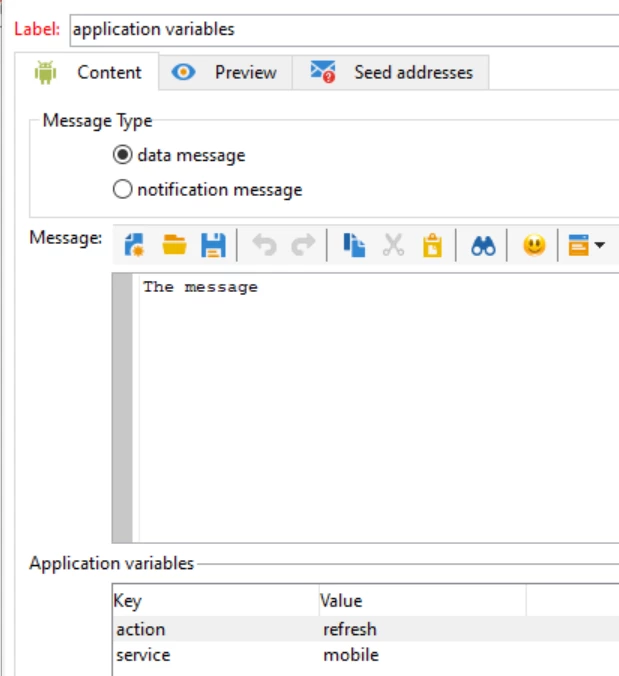
The expected format in the app is: {action: 'refresh', service: 'mobile'}.


Has anyone encountered similar issue?


Best,

Dominik

This post is no longer active and is closed to new replies. Need help? Start a new post to ask your question.

1 reply

Manoj_Kumar
Community Advisor
Community Advisor
September 11, 2024

Hello @dwnuk  It is not an issue with Configuration in Adobe Campaign. Check with Mobile development team if they are validating the parameters before accepting the notification. 

Manoj  | https://themartech.pro
dwnukAuthor
Level 3
September 16, 2024

Hi @_manoj_kumar_ 

The issue is that the push notification triggered from Firebase with the same parameters is received on the mobile app. Additionally, there is no validation made for the parameters. How can I view the body of request send to Firebase/APNS?


Best,

Dominik