Add a where element to queryDef through javascript. | Community
Skip to main content
Level 3
June 26, 2019
Solved

Add a where element to queryDef through javascript.

  • June 26, 2019
  • 3 replies
  • 6403 views

var query =  <queryDef schema = "temp:enrich32" operation="select">

                             <select>

                                 <node expr="@firstName"/>

                            </select>

                            <where>

                             </where>

                    </queryDef>

var condition =   <condition boolOperator="AND">

                            <condition>

                            <condition boolOperator="OR" internalId="0" expr="@gender = 'M'"/>

                            <condition boolOperator="OR" internalId="1" expr="@gender = 'F'"/>

                           </condition>

I want to add the condition into the where in query in a javascript activity.

This post is no longer active and is closed to new replies. Need help? Start a new post to ask your question.
Best answer by Florian_Courgey

Hi,

You can use Javascript JXON then, it's easier. Consider the following workflow:
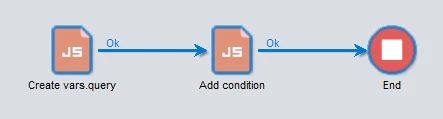
Activity 1:

var query = {queryDef: {

  schema: "temp:enrich32",

  operation: "select",

  select:{ node: [

    {expr: "@firstName"}

  ]},

  where:{}

}};

vars.query = JSON.stringify(query); // string

Activity 2:

var query = JSON.parse(vars.query); // json

var condition = {

  boolOperator: 'AND',

  condition:[

    {boolOperator: 'OR', internalId: "0", expr: "@gender = 'M'"},

    {boolOperator: "OR", internalId: "1", expr: "@gender = 'F'"},

  ],

};

query.queryDef.where.condition = condition; // add condition to the query

You may use directly query as a JXON (see Using XML ) or convert it with "DOMDocument.fromJXON(query).toXMLString()" which outputs:

<?xml version='1.0'?>

<queryDef operation="select" schema="temp:enrich32">

     <select>

          <node expr="@firstName"/>

     </select>

     <where>

          <condition boolOperator="AND">

               <condition boolOperator="OR" expr="@gender = 'M'" internalId="0"/>

               <condition boolOperator="OR" expr="@gender = 'F'" internalId="1"/>

          </condition>

     </where>

</queryDef>

Regards

3 replies

Florian_Courgey
Level 4
June 26, 2019

Hi,

You can do query.where.appendChild(condition)

See this blog post for more examples

Regards

Level 3
June 26, 2019

Hi floriancourgey

I have the condition in the string format which is passed from another javascript activity. when I try to append the conditon to the query , the '<' and '>' symbols in the condition are replaced with '&lt' and '&gt' symbols. Because of this the query is not working. Is there any way to add the condition.

Thanks and Regards

Rahul G

Florian_Courgey
Florian_CourgeyAccepted solution
Level 4
June 27, 2019

Hi,

You can use Javascript JXON then, it's easier. Consider the following workflow:

Activity 1:

var query = {queryDef: {

  schema: "temp:enrich32",

  operation: "select",

  select:{ node: [

    {expr: "@firstName"}

  ]},

  where:{}

}};

vars.query = JSON.stringify(query); // string

Activity 2:

var query = JSON.parse(vars.query); // json

var condition = {

  boolOperator: 'AND',

  condition:[

    {boolOperator: 'OR', internalId: "0", expr: "@gender = 'M'"},

    {boolOperator: "OR", internalId: "1", expr: "@gender = 'F'"},

  ],

};

query.queryDef.where.condition = condition; // add condition to the query

You may use directly query as a JXON (see Using XML ) or convert it with "DOMDocument.fromJXON(query).toXMLString()" which outputs:

<?xml version='1.0'?>

<queryDef operation="select" schema="temp:enrich32">

     <select>

          <node expr="@firstName"/>

     </select>

     <where>

          <condition boolOperator="AND">

               <condition boolOperator="OR" expr="@gender = 'M'" internalId="0"/>

               <condition boolOperator="OR" expr="@gender = 'F'" internalId="1"/>

          </condition>

     </where>

</queryDef>

Regards