Access Management for Visual Fragments | Community
Skip to main content
Level 3
April 9, 2025
Question

Access Management for Visual Fragments

  • April 9, 2025
  • 2 replies
  • 1014 views

Hello, what named rights are required to create Visual Fragments in the ACCv8 web console? We are running version 8.6.4 and admin users are able to create visual fragments, but for end users, the "visual fragment" option is greyed out.
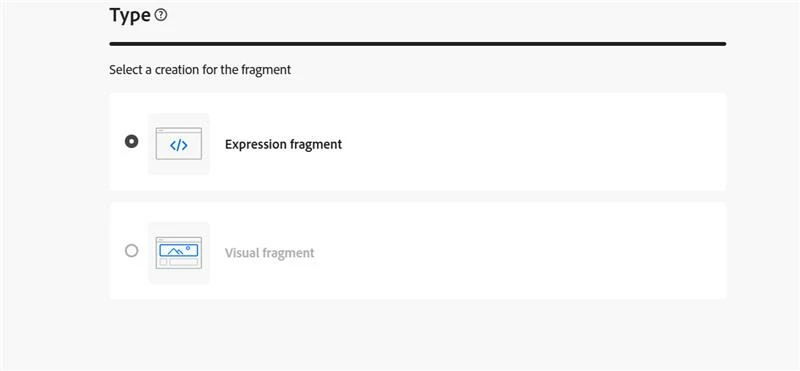
 

They are able to create expression fragments. What permissions are required for visual fragments / where are these permissions controlled?

2 replies

SushantTrimukheD
Level 4
April 10, 2025

Hi @skylerqu2,

Please check if the user has the 'WEBAPP' named rights and the necessary folder access. If not, grant the appropriate rights and try again.

Also, make sure to grant folder access by ensuring the end users' group has Write permissions to the Resources > Content Fragments folder (or wherever the visual fragments are stored).

Thanks

Sushant Trimukhe

SkylerQu2Author
Level 3
April 10, 2025

Hi @sushanttrimukhed  thank you for your answer. Where can I control the write permissions to the Resources > Campaign Management > Content Visual Fragments folder, as this folder is not present in the client console?

SkylerQu2Author
Level 3
April 10, 2025

I have created a user group that has the 'WEBAPP' named rights and WRITE access to the Resources > Campaign Management folder (with propagation). However, they are still unable to create visual fragments.

Sukrity_Wadhwa
Community Manager
Community Manager
April 22, 2025

Hi @skylerqu2,

Were you able to resolve this query with the help of the provided solutions, or do you still need further assistance? Please let us know. If any of the answers were helpful in moving you closer to a resolution, even partially, we encourage you to mark the one that helped the most as the 'Correct Reply.'

Thank you!

Sukrity Wadhwa
SkylerQu2Author
Level 3
April 22, 2025

Hi @sukrity_wadhwa  unfortunately the solutions above have not resolved the issue. I have provided an update in the replies.


Thank you,

Skyler