ACC V7 Delivery | Community
Skip to main content
Level 6
July 3, 2025
Solved

ACC V7 Delivery

  • July 3, 2025
  • 1 reply
  • 420 views

Hi, we are facing an issue where while trying to send a proof, a delivery ID is getting generated but no delivery is generated for it. What could be the reason?

Best answer by ParthaSarathy

Hi @sanjana12 ,

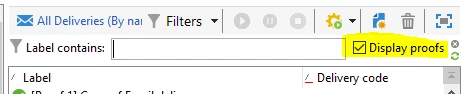
To troubleshoot it, create a delivery folder and make it as a view. Then you find a 'Display proofs' checkbox, enable it. Search for the delivery label, you can find '[Proof X] <Delivery label>'. Open it and go to audit tab for checking the reason.


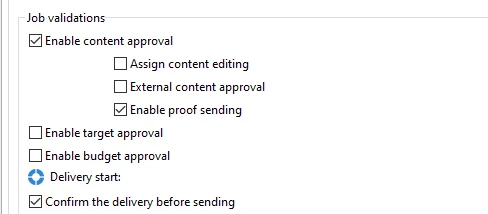
Also, You can create a recurring delivery in a campaign and add proof addresses in 'To' > Target of the proofs; And go to Property > approvals > enable below options and start the workflow. After the delivery is created in campaign dashboard, repeat the step mentioned above and search by enabling 'Display proofs'

1 reply

ParthaSarathy
Community Advisor
ParthaSarathyCommunity AdvisorAccepted solution
Community Advisor
July 3, 2025

Hi @sanjana12 ,

To troubleshoot it, create a delivery folder and make it as a view. Then you find a 'Display proofs' checkbox, enable it. Search for the delivery label, you can find '[Proof X] <Delivery label>'. Open it and go to audit tab for checking the reason.


Also, You can create a recurring delivery in a campaign and add proof addresses in 'To' > Target of the proofs; And go to Property > approvals > enable below options and start the workflow. After the delivery is created in campaign dashboard, repeat the step mentioned above and search by enabling 'Display proofs'

~  ParthaSarathy S~  Click here to join ADOBE CAMPAIGN USER GROUP for Quarterly In-person | Hybrid | Virtual Meetups
Sanjana12Author
Level 6
July 3, 2025

The delivery was actually deleted but nobody knows how. Any idea how a delivery can be deleted just like that? We also found some issue with the delivery content for which the proofs were failing. Could that be a reason?

ParthaSarathy
Community Advisor
Community Advisor
July 4, 2025

Hi @sanjana12 ,

sometimes you can find the deleted deliveries under /Campaign Management/Deliveries/Deleted deliveries/ folder. A delivery might get deleted only if some operator manually deletes it or by using a workflow to delete it or from database deletion. If there is an automated process of taking a backup daily of your ACC instance, then you can recover it by contacting the database team. Or else it is not possible to recover. 

~  ParthaSarathy S~  Click here to join ADOBE CAMPAIGN USER GROUP for Quarterly In-person | Hybrid | Virtual Meetups