
Solved
ACC data-nl tags in webapps
Hi All,
I am trying to get a webapp with the new page activity to store user submitted data (just a few marketing preferences flags) into a custom schema and I am having trouble making it work.
- I have set the webapp's document storage type to my custom schema
- I've updated the checkboxes to point to the xpath of the mkt flags
- e.g. <input class="custom-control-input" id="uni_news" type="checkbox" checked="checked" data-nl-bindto="xpath" data-nl-xpath="@uosUniversityNews" data-nl-label="University news" />
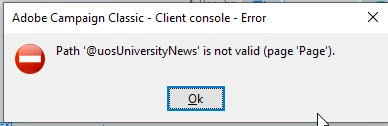
The webapps keeps popping up errors

Context: There is an existing webapp used for recipients to submit their marketing preferences to news and subscriptions, and the nl-data tags can be bound very easily to the ootb recipient schema
<div class="custom-control custom-checkbox mr-sm-2 align-items-right"><input class="custom-control-input" id="uni_news" type="checkbox" checked="checked" data-nl-checkboxbehavior="subscription" data-nl-servicename="uosUniversityNews" data-nl-servicelabel="University news" data-nl-bindto="service" /> <label class="custom-control-label" for="uni_news">Yes</label></div>
So now I want to modify it to write to a custom schema?? isnt data-nl tags supposed to allow me to easily achieve this? or Im I missing something.