
AC Tips & Tricks: Execute delivery notifications from webapps
Context
A simple method to execute notification deliveries on the fly without relying on a workflow to perform the delivery phase. This approach is effective if you need to send a small volume of notifications triggered by user actions on webapps, i.e. user data profile changes, preference centre changes, password changes, etc. temporary data is captured at webapp context and xml delivery target enriched with these values that are then rendered by delivery template.
SubmitNotification
var scenario      = 'DM6885'; // delivery template internal name (string)
var recipientId   = 13250506; // target recipient - change to variable containing id

        var deliveryId = nms.delivery.SubmitNotification(scenario,
        <delivery>
          <targets>
            <deliveryTarget>
              <targetPart exclusion='false' ignoreDeleteStatus='false'>
                <where>
                  <condition expr={'@id='+recipientId} />
                </where>
              </targetPart>
            </deliveryTarget>
          </targets>
        </delivery>);
Targets
You could select all targets in a folder by changing the expression (expr='[@folder-id] = 1050') where 1050 is the ID of the folder containing recipients. Explore multiple ways of targeting recipients by checking the documentation JSAPI.
Template configuration
To enrich delivery with values assigned to variables, configuration is required on the template. You can configure these variable by going to template’s “Properties/Variables”. In the following example a template has been configured to capture data modified on a bookings webapp.
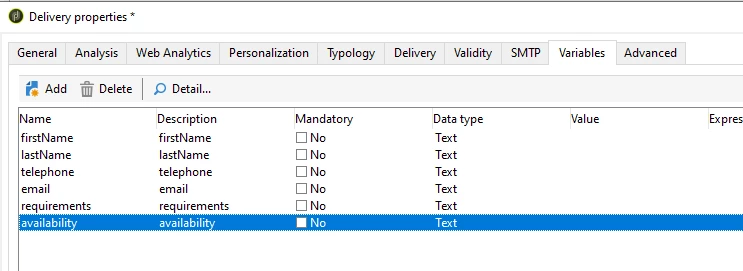
The following html will render delivery variable data.
|
First name |
<%=variables.firstName%> |
|
Last name |
<%=variables.lastName%> |
|
Telephone |
<%=variables.telephone%> |
|
|
<%=variables.email%> |
|
Requirements |
<%=variables.requirements%> |
|
Availability |
<%=variables.availability%> |
SubmitNotification enhanced
Now that your template is configured, the javascript code must be enhanced to capture and compile delivery with variables.
        var scenario      = 'DM000'; // delivery template internal name
        var recipientId   = 123567; //delivery target

        var xmlTarget =  <delivery>
                          <targets>
                            <deliveryTarget>
                              <targetPart exclusion='false' ignoreDeleteStatus='false'>
                                <where>
                                  <condition expr={'@id='+recipientId} />
                                </where>
                              </targetPart>
                            </deliveryTarget>
                          </targets>
                        </delivery>;

         var model  = nms.delivery.CreateFromModel(scenario, xmlTarget); //creation of a delivery from a template's internal name
         var delivery   = nms.delivery.create(model);

          delivery.variables._var[0].stringValue = ctx.vars.availability.toString();    //availability
          delivery.variables._var[1].stringValue = ctx.vars.requirements.toString();    //requirements
          delivery.variables._var[2].stringValue = ctx.vars.email.toString();           //email
          delivery.variables._var[3].stringValue = ctx.vars.telephone.toString();       //telephone
          delivery.variables._var[4].stringValue = ctx.vars.lastName.toString();        //lastName
          delivery.variables._var[5].stringValue = ctx.vars.firstName.toString();       //firstName

          delivery.save();

          nms.delivery.PrepareFromId(delivery.id); //analyze a delivery
In the following webapp example, recipient makes changes to their profile, these temp values are pre-processed (stored in custom schema or recipient schema) and then notification email is triggered to recipient about the recent changes, note that the recipient ID is hardcoded in this case for testing purposes.

Documentation
https://experienceleague.adobe.com/developer/campaign-api/api/sm-delivery-SubmitNotification.html
https://experienceleague.adobe.com/developer/campaign-api/api/sm-delivery-CreateFromModel.html
https://experienceleague.adobe.com/developer/campaign-api/api/sm-delivery-PrepareFromId.html