About Reconciliation type in Union activity | Community
Skip to main content
November 1, 2023
Solved

About Reconciliation type in Union activity

  • November 1, 2023
  • 1 reply
  • 1753 views

What is the difference of “All shared columns” and “A selection of columns”?

I read the document and understood that “All shared columns” can be used if the inbound population targeting dimensions are different.

However, once I implemented, it didn’t work.

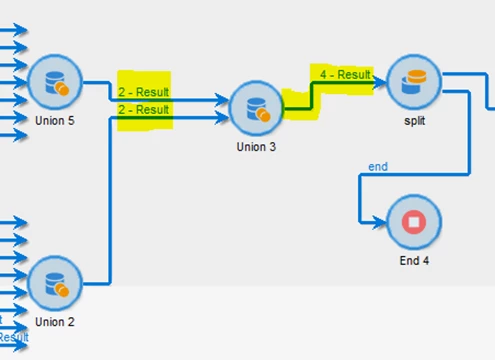
Union5: Gather attendance data from data schema A.

Union2: Gather attendance data from data schema B.

Union3: Put together data schema A and B. Use “All shared columns”.

The inbound transition after Union3, the result is 4. However, to check display the target, the result is only 2. I noticed that the activity which I chose in primary set in Union3’s data remained and the other missed.

I would like to keep these 4 data. Is there any other way to solve this issue? Thank you.
 

This post is no longer active and is closed to new replies. Need help? Start a new post to ask your question.
Best answer by ParthaSarathy

@akari2 , The documentation link seems to be of Campaign standard's doc. Below is how union will work in classic,

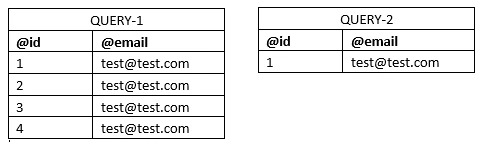
If you have two queries of same targeting dimension, with result as

When you Union these both results, in reconciliation 

  • by selecting 'keys only', The output will be 4. Since @id=1 (@id is the key) is there in both queries, one record will get dedup and the result will be 4.
  • by selecting 'A selection of column', Primary set as 'Query-2' and selecting field as @email, the output will be 1. Since all the records in both query has same email ID, all records will get dedup and the output result will be 1. (If you had selected 'Query-1' as Primary set, then output will be 4)
  • by selecting 'All shared columns', Primary set as 'Query-1', The output will be 4, as all column values are same.

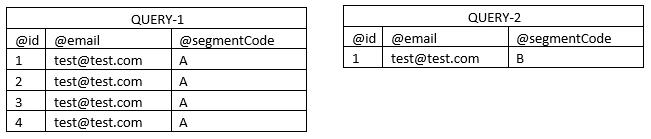
But if you required to have the output of Union as 5 (Query1 result + Query2 result), add segment code to the query to differentiate a column value in both query.

Now in union, select 'All shared columns' and you will get the result as 5.

If you have 2 different targeting dimension, then the output of union in Adobe campaign Classic will have only the count of primary set's record. So if required, after your union-5 or union-2 in your workflow, have a change dimension activity and change its targeting dimension same as other union and run your workflow. It will work!

1 reply

ParthaSarathy
Community Advisor
Community Advisor
November 1, 2023

Hi @akari2 ,

Union should have all input transition from same targeting dimension. If not, by selecting 'all shared columns' or 'A selection of column', it will result output of 'Primary set'.

~  ParthaSarathy S~  Click here to join ADOBE CAMPAIGN USER GROUP for Quarterly In-person | Hybrid | Virtual Meetups
akari2Author
November 1, 2023

Hi @parthasarathy ,

Thank you for answering. I understood.

However, in Union, it seems that the explanation is different.

Could you please check the last sentence?

Thank you.

  • All shared columns: The data is reconciled on the basis of all the columns in common with the inbound transitions. Therefore, you have to select the primary set that will be kept in case of a duplicate. This option can be used if the inbound population targeting dimensions are different.

ParthaSarathy
Community Advisor
ParthaSarathyCommunity AdvisorAccepted solution
Community Advisor
November 3, 2023

@akari2 , The documentation link seems to be of Campaign standard's doc. Below is how union will work in classic,

If you have two queries of same targeting dimension, with result as

When you Union these both results, in reconciliation 

  • by selecting 'keys only', The output will be 4. Since @id=1 (@id is the key) is there in both queries, one record will get dedup and the result will be 4.
  • by selecting 'A selection of column', Primary set as 'Query-2' and selecting field as @email, the output will be 1. Since all the records in both query has same email ID, all records will get dedup and the output result will be 1. (If you had selected 'Query-1' as Primary set, then output will be 4)
  • by selecting 'All shared columns', Primary set as 'Query-1', The output will be 4, as all column values are same.

But if you required to have the output of Union as 5 (Query1 result + Query2 result), add segment code to the query to differentiate a column value in both query.

Now in union, select 'All shared columns' and you will get the result as 5.

If you have 2 different targeting dimension, then the output of union in Adobe campaign Classic will have only the count of primary set's record. So if required, after your union-5 or union-2 in your workflow, have a change dimension activity and change its targeting dimension same as other union and run your workflow. It will work!

~  ParthaSarathy S~  Click here to join ADOBE CAMPAIGN USER GROUP for Quarterly In-person | Hybrid | Virtual Meetups