Level 3
April 15, 2026
Question

Workfront Fusion: Unable to Connect to Workfront Proof (Request Timeout Error)

  • April 15, 2026
  • 4 replies
  • 102 views

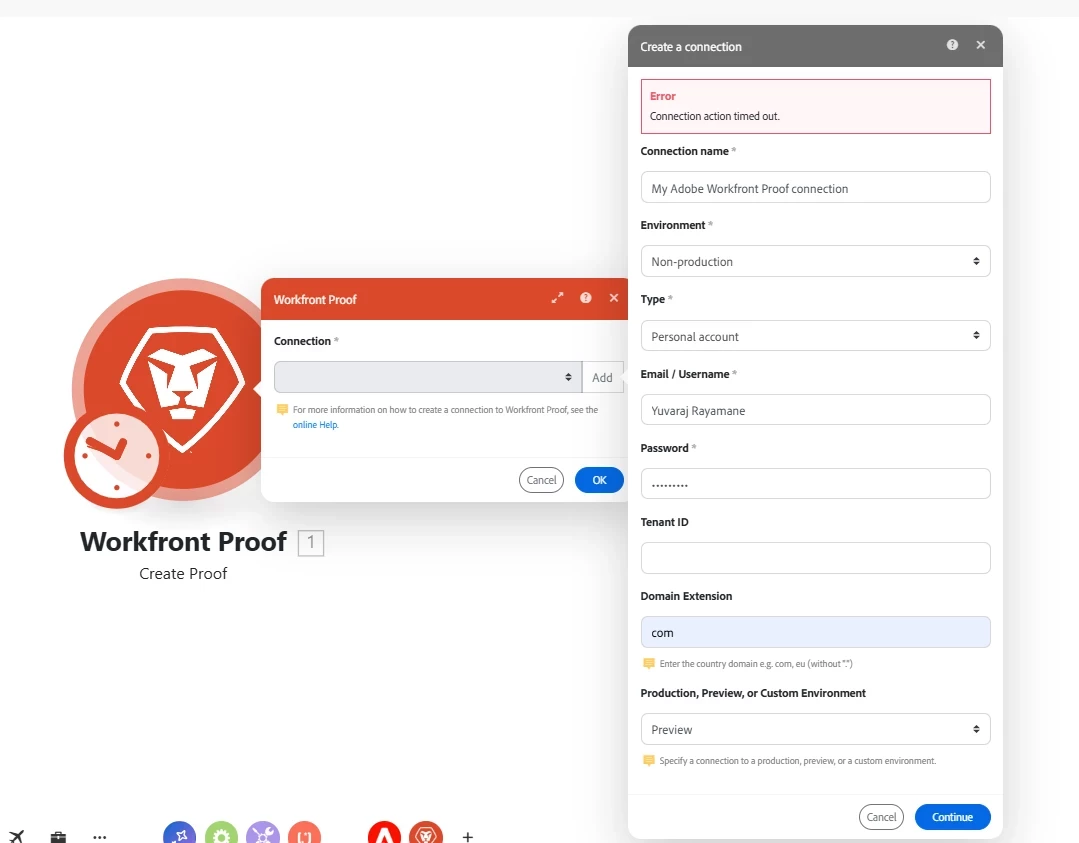
Hi all, working on making a connection between Workfront Core (Sandbox instance) and Workfront Proof. I'm trying to set up the connection module in Fusion, but I'm consistently getting a Request Timeout error when I attempt to authenticate.

I've double-checked the credentials and endpoints, and everything seems to be configured correctly from my end. I've attached a screenshot for reference in case it helps identify the issue.
 

4 replies

Kurt_Jones
Community Advisor and Adobe Champion
April 15, 2026

When you add a user in adminconsole, do you create them with an email address or a unique company ID?  It’s usually one or the other.  In email/username field you have your name typed, it likely needs to be your email address.

If my response answered your question, please mark it answered, so others can find the answer
Level 3
April 15, 2026

I just tried it with my email address also. 

Level 3
April 15, 2026

Even I have an administrator access in proof but I cannot add connection it is showing “Connection action timed out.”

CristinaLiaD
Level 1
April 17, 2026

Hi, Proof sandboxes are not standard. Preview is typically used for Fusion Proof testing.

ninoskuflic
Level 5
April 20, 2026

Try to log in to your ProofHQ instance to verify that username/password is correct and we can take it from there. You can also request a password reset from that page if necessary. 😀


US Instance:

Test Drive

ProofHQ SOAP: https://soap.testdrive.proofhq.com/21_3_0/soap.wsdl

ProofHQ login, password reset: https://testdrive.proofhq.com/login


Preview 

ProofHQ SOAP: https://soap.preview.proofhq.com/21_3_0/soap.wsdl

ProofHQ login, password reset: https://preview.proofhq.com/login


Production

ProofHQ SOAP: https://soap.proofhq.com/21_3_0/soap.wsdl

ProofHQ login, password reset: https://app.proofhq.com/login

NOTE: Your Workfront Test Drive instance is on the US servers.


EU Instance

Test Drive

ProofHQ SOAP: Does Not Exist

ProofHQ login, password reset: https://testdrive.proofhq.eu/login


Preview

ProofHQ SOAP: https://soap.preview.proofhq.eu/21_3_0/soap.wsdl

ProofHQ login, password reset: https://app.preview.proofhq.eu/login


Production

ProofHQ SOAP: https://soap.proofhq.eu/21_3_0/soap.wsdl

ProofHQ login, password reset: https://app.proofhq.eu/login

If this solved your issue, please mark it as solved so others can find the solution faster.
Level 1
April 24, 2026

Hello ninoskuflic,


I tried resetting the pwd, but it doesn’t seem to be working :/ I think we need the creds if we use a normal HTTP module (https://<domain>.preview.proofhq.com/api/v2/proof) and WF proof module, correct?


Thanks!

ninoskuflic
Level 5
April 26, 2026

If you cannot reset the password, you can ask Adobe Support to also do it for you. They can then send you the password via e-mail. 


And yes, regardless if you use HTTP module or Workfront Proof module you need to perform authentication. 😅

If this solved your issue, please mark it as solved so others can find the solution faster.
KristyAnn
Level 2
April 28, 2026

Hello,

I am having the same issue with this, I can add myself who had an Workfront and ProofHQ account prior to the admin console migration, but the newer account I am trying to add I continue to get the same “Connection action timed out.” error. Did anyone find a solution yet? I have tried the same access as admin console and that does not appear to work and have unsuccessfully tried using the password reset option.

ninoskuflic
Level 5
April 28, 2026

The account password for ProofHQ is different from the one for Workfront. If you cannot reset the password on your own, I recommend reaching out to Adobe Suppport and they can reset it for you. 😊

If this solved your issue, please mark it as solved so others can find the solution faster.
KristyAnn
Level 2
April 29, 2026

Yes, that was all I needed to do, thank you!