
Workfront Fusion: Mapping plain text into a Rich Text Field | Adobe Higher Education
Skip to main content
KellieGardner
Community Advisor
Community Advisor
May 1, 2024
Resuelto

Workfront Fusion: Mapping plain text into a Rich Text Field

  • May 1, 2024
  • 1 respuesta
  • 896 visualizaciones

I have a scenario that is mapping data into Workfront from excel  and the fields I'm trying to map to were created as Formatted Paragraph fields which are rich text fields.


I'm not able to map them directly as it throws an error [403] The following parameter value is invalid 'Ad Specs'. Please adjust and try again.


How do I convert the plain text into something that can be mapped into that field? 
Mejor respuesta de KellieGardner

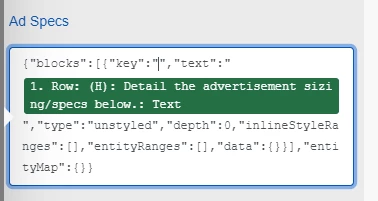
I was able to figure this out after lots of trial and error. For those looking you have to format the field you are mapping to with a JSON string and put the item you are trying to map in between the " " for the Text option.


{"blocks":[{"key":"","text":"PUT YOUR FIELD/TEXT HERE","type":"unstyled","depth":0,"inlineStyleRanges":[],"entityRanges":[],"data":{}}],"entityMap":{}}

1 respuesta

KellieGardner
Community Advisor
KellieGardnerCommunity AdvisorAutorRespuesta
Community Advisor
May 2, 2024

I was able to figure this out after lots of trial and error. For those looking you have to format the field you are mapping to with a JSON string and put the item you are trying to map in between the " " for the Text option.


{"blocks":[{"key":"","text":"PUT YOUR FIELD/TEXT HERE","type":"unstyled","depth":0,"inlineStyleRanges":[],"entityRanges":[],"data":{}}],"entityMap":{}}