Workfront Announcement: [ACTION REQUIRED] Workfront Fusion Watch Module - Upgrade to Event Subscription v2 | Adobe Higher Education
Skip to main content
Level 2
April 21, 2025
해결됨

Workfront Announcement: [ACTION REQUIRED] Workfront Fusion Watch Module - Upgrade to Event Subscription v2

  • April 21, 2025
  • 1 답변
  • 1009 조회

Hi All,

I have a query regarding the event subscription version. I’ve noticed that for newly created scenarios, the subscription version defaults to V2.
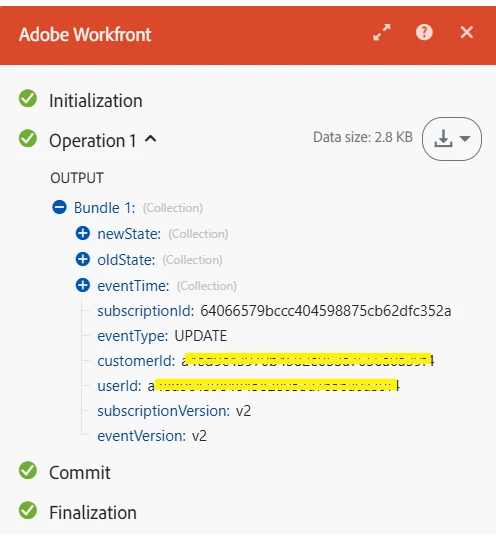
 

and for old scenarios it is showing v1, 
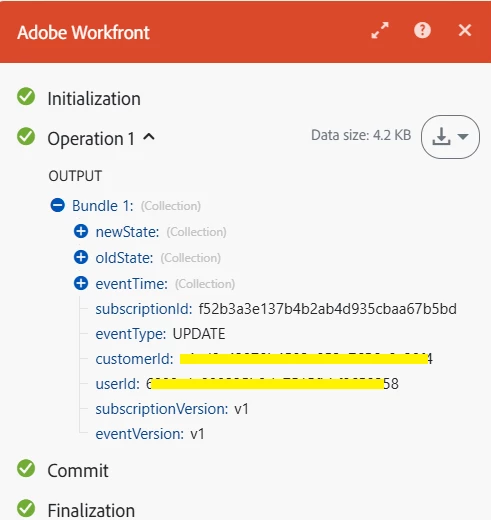
 

In this case, do we just need to use the new module from Adobe Workfront to ensure the scenario runs with Subscription Version V2?


Thanks in Advance!

최고의 답변: _Manish_Singh

Starting April 10, 2025, all event subscriptions will be v2 by default. So, all watch modules will default to v2.

For more information about the comparison between v1 and v2, upgrade process, and timelines, please refer to the following pages:

Announcement: Other enhancements during the Second Quarter 2025 release timeframe | Adobe Workfront
Comparision: Event Subscription Versioning | Adobe Workfront
Version Upgrade: Event Subscription API | Adobe Workfront

1 답변

_Manish_Singh
Level 9
April 22, 2025

Starting April 10, 2025, all event subscriptions will be v2 by default. So, all watch modules will default to v2.

For more information about the comparison between v1 and v2, upgrade process, and timelines, please refer to the following pages:

Announcement: Other enhancements during the Second Quarter 2025 release timeframe | Adobe Workfront
Comparision: Event Subscription Versioning | Adobe Workfront
Version Upgrade: Event Subscription API | Adobe Workfront

SamyukthaPa작성자
Level 2
April 22, 2025

Hi @_manish_singh 


Thanks for the response!


So even it is default to V2 version we need to run the below API ?

PUT https://<HOSTNAME>/attask/eventsubscription/api/v1/subscriptions/version
_Manish_Singh
Level 9
April 22, 2025

When the version is v2, no action is required.

For upgrades from v1 to v2, you need to run the PUT call as you mentioned.