Unable to send email notification to multiple projects in workfront fusion | Community
Skip to main content
Level 2
March 25, 2025
Solved

Unable to send email notification to multiple projects in workfront fusion

  • March 25, 2025
  • 3 replies
  • 1038 views

Hi,


I am currently working on a scenario where I need to trigger an e-mail notification to all the project owners under the "Event " program about their incomplete task before 5 days to the "Event Date" (custom field). 


I have created the scenario but its sending the notification only to a single project (1st in the queue) and not sending the notification to all the other projects that under the "Event" program.


I have create the custom API to get the all the data->used Iterator->created the set variable to get the no.of days lefts. Its working fine but only for just one project and sending notification to all the projects.

Sharing the screenshot for reference. 
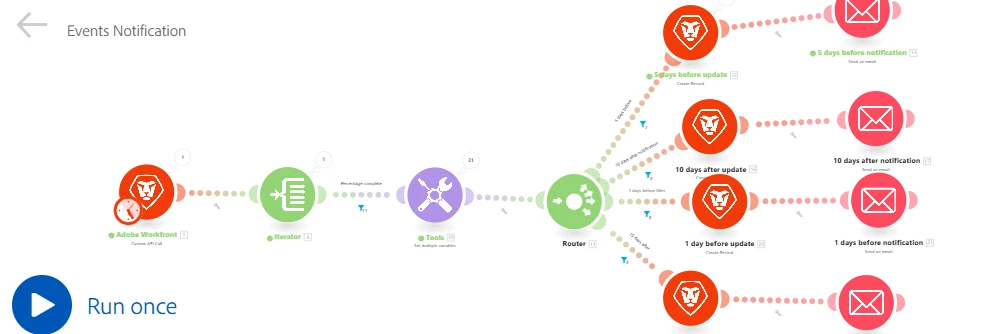


Any suggestion or different approach would be highly appreciated. TIA!

Best answer by Sven-iX

Like I said I would not have branches : ) 
The reason is you're duplicating modules for no good reason: All that changes is the content the CreateRecord and SendEmail modules use. May not affect you here, but as scenarios get more complex you really want to avoid duplicating logic.

Reason yours is not working is because you iterate over the tasks of the first project the CustomAPIModule brings back. 

Unlike a Search module, the Custom API module does not have a built-in iterator. 

So I would say:

  • Custom API call: remove the query string and use the querystring options below. Easier to maintain
    You may want to put any IDs you use for lookup into a setMultipleVariables module, again, easier to maintain
  • Iterator on {{1.body.data}}
  • second iterator on {{2.tasks}}
  • Instead of router, put switch with the filters, use the "before/after" as input; it's like a big if-then
  • Add a second switch for the content (if it's different in the updates/email
  • then create update & send email. 

3 replies

lgaertner
Level 9
March 25, 2025

Hello @himanshu4,


The resolution of the screenshot is too low to really use them as an aid.

It would be interesting, what you set up as the filters for each route.


At the moment it looks like your bundles do only pass the filter for the first route.


Regards

Lars

Himanshu4Author
Level 2
March 25, 2025

Hi @lgaertner ,


Thank you so much for looking into this. its only sending the notification to a single project which is under the "Event" program and not for all the projects. 


I am sharing the screenshots again of the filters that I used and complete scenario. 


Custom API:


Iterator:-


Percentage Complete filter to filter out the task that are less than 100%


Set variable to get the no. of days left:-


Filter to send the notification 5 days before:


Regards,

Himanshu


Sven-iX
Community Advisor
Community Advisor
March 25, 2025

My suggestion: 

  • Use a setvar to determine the path based on date
  • Then use a switch module to modify the text based on the dates
  • Then have a single path to create update and send email (less duplication and logic in one place)
Himanshu4Author
Level 2
March 25, 2025

@sven-ix 


Thank you for looking into this. Can't we achieve it this way?

I am getting the notification only for the single project and not for all the projects under the "Event" program. That's the only issue, If we can figure it out. Would save the a lot of time as I am totally new to Fusion. Please suggest.


I am sharing the screenshots again of the filters that I used and complete scenario. 


Custom API:


Iterator:-


Percentage Complete filter to filter out the task that are less than 100%


Set variable to get the no. of days left:-


Filter to send the notification 5 days before:


Regards,

Himanshu


Sven-iX
Community Advisor
Sven-iXCommunity AdvisorAccepted solution
Community Advisor
March 25, 2025

Like I said I would not have branches : ) 
The reason is you're duplicating modules for no good reason: All that changes is the content the CreateRecord and SendEmail modules use. May not affect you here, but as scenarios get more complex you really want to avoid duplicating logic.

Reason yours is not working is because you iterate over the tasks of the first project the CustomAPIModule brings back. 

Unlike a Search module, the Custom API module does not have a built-in iterator. 

So I would say:

  • Custom API call: remove the query string and use the querystring options below. Easier to maintain
    You may want to put any IDs you use for lookup into a setMultipleVariables module, again, easier to maintain
  • Iterator on {{1.body.data}}
  • second iterator on {{2.tasks}}
  • Instead of router, put switch with the filters, use the "before/after" as input; it's like a big if-then
  • Add a second switch for the content (if it's different in the updates/email
  • then create update & send email. 
Level 2
March 26, 2025

Your current iterator is iterating through tasks in the first project fetched.

You should have one more iterator after first module to iterate through Projects in Program.

Himanshu4Author
Level 2
March 27, 2025

@v-ellur Thanks for looking into it. Yes, you are right. I tried using 2 Iterator one for project and other for task. It Worked.

Sven-iX
Community Advisor
Community Advisor
March 27, 2025

I'm glad. Thanks for letting us know!